This is default featured slide 1 title

Go to Blogger edit html and find these sentences.Now replace these sentences with your own descriptions.This theme is Bloggerized by Lasantha Bandara - Premiumbloggertemplates.com.

This is default featured slide 2 title

Go to Blogger edit html and find these sentences.Now replace these sentences with your own descriptions.This theme is Bloggerized by Lasantha Bandara - Premiumbloggertemplates.com.

This is default featured slide 3 title

Go to Blogger edit html and find these sentences.Now replace these sentences with your own descriptions.This theme is Bloggerized by Lasantha Bandara - Premiumbloggertemplates.com.

This is default featured slide 4 title

Go to Blogger edit html and find these sentences.Now replace these sentences with your own descriptions.This theme is Bloggerized by Lasantha Bandara - Premiumbloggertemplates.com.

This is default featured slide 5 title

Go to Blogger edit html and find these sentences.Now replace these sentences with your own descriptions.This theme is Bloggerized by Lasantha Bandara - Premiumbloggertemplates.com.

How to Use ChatGPT’s Deep Research


ChatGPT’s Deep Research
ChatGPT is widely recognized as the leading AI chatbot, utilized by millions of users today. Are you aware of its feature known as 'Deep Research '? 

This feature, once exclusive to Plus subscribers, is now accessible to free account holders, albeit with certain limitations. 'Deep Research' acts as an agent that employs reasoning to aggregate extensive online information and execute complex research tasks on your behalf.

 This feature autonomously navigates the internet, collects information from various sources, and produces comprehensible reports on intricate subjects.\

How to Use Deep Research on ChatGPT?

Deep Research is integrated into ChatGPT; however, it does have certain limitations that will be discussed later in this article. Initially, let us explore how to utilize the Deep Research tool within ChatGPT. 

1.To begin, access the web version of ChatGPT on your computer. 

2.Next, input the text prompt (topic) for which you wish to conduct Deep Research. For instance, I am interested in learning about Almonds.

Deep-Research-1

3. Once you have entered the text prompt, click the Deep Research option. 


Deep-Research-2
4. ChatGPT will come up with a summary. If you’re okay with it, you can ask it to do deep research.

Deep-Research-3
5. ChatGPT will start the deep research. You need to wait for a few minutes. Sometimes, the Deep Research can take up to 30 minutes. So, be patient.


Deep-Research-4

Limitations of ChatGPT’s Deep Research

The Deep Research feature is accessible to all users; however, it has certain restrictions. Free users are limited to 5 Deep Research queries each month. In contrast, Team, Enterprise, and Edu users are allotted 25 queries monthly, while Pro users can utilize up to 250 queries. Once the limit for the full version is reached, queries will automatically transition to the lightweight version. This guide provides instructions on how to utilize the ChatGPT deep research tool. Should you require further assistance on this subject, please inform us in the comments. Additionally, if you find this guide beneficial, kindly share it with your acquaintances.

How to Fix iPhone Won’t Connect to WiFi


iPhone Won’t Connect to WiFi
There are various reasons why your iPhone may not connect to a WiFi network, typically stemming from incorrect WiFi configurations or issues with the router. Regardless of the cause, if your iPhone is unable to connect to a WiFi network, here are some steps you can take to resolve the issue.

1. Restart your iPhone

Restart your iPhone
The initial action in any troubleshooting procedure is to perform a basic restart. A temporary glitch or bug may be hindering your iPhone's ability to connect to a particular Wi-Fi network. 

The most effective method to resolve such issues is to restart your iPhone. To do this, press the Volume button along with the side button to access the Power menu. From the Power menu, choose the Slide to Restart option. Once the device has restarted, navigate to Settings > WiFi and attempt to reconnect to the Wi-Fi network .

2. Check your Router and ensure your iPhone is within range

 If your iPhone is beyond the coverage area of the WiFi network you are attempting to connect to, the connection will be unsuccessful

. It is essential to verify whether the WiFi router is powered on and if it appears on the list of available networks on your iPhone. If the router is indeed powered on, ensure that you are within an adequate distance from it. You can verify this by observing the WiFi signal strength indicators on your iPhone's status bar .

3. Re-enable the WiFi on your iPhone

enable WiFi on iPhone

 If you are experiencing difficulties connecting to a particular WiFi network that is within range, it is advisable to disable and then re-enable the WiFi feature on your iPhone. 

This action may resolve any bugs or glitches that could be hindering your iPhone's ability to connect to the desired WiFi network. To do this, access the Settings application on your iPhone, select WiFi, turn off the toggle next to WiFi, and after a brief pause, turn it back on .

4. Turn On/Off the Airplane mode

Airplane mode

Numerous iPhone users have reported resolving WiFi issues by toggling Airplane mode on and off. Activating Airplane mode disconnects all network services, including WiFi and Bluetooth. 

This temporary disconnection allows for a reset of network connections. After activating Airplane mode, it is advisable to wait for approximately one minute before deactivating it. Once Airplane mode is turned off, verify if your iPhone can successfully connect to the WiFi network. 

5. Reset the Network Settings on iPhone

 If you are experiencing difficulties with your iPhone connecting to WiFi following an iOS update, it is advisable to reset the Network Settings. 

Incorrect or incompatible network configurations are a significant cause of WiFi connectivity issues on iPhones. Attempting to reset the Network Settings may resolve the problem.

1. To get started, launch the Settings app on your iPhone.

Settings app on iPhone.
2. When the Settings app opens, tap on General.
iPhone  Settings
3. On the General screen, tap on Transfer or Reset iPhone.

Reset iPhone.
4. On the Transfer or Reset iPhone screen, select Reset.
 
Reset iPhone
5. You will see a pop-up showing you the types of Reset. Pick the Reset Network Settings option.


Network Settings option.

6. You will be asked to enter your iPhone’s passcode. Enter it to continue.

iPhone’s passcode.


7. On the Reset confirmation prompt, tap on Reset Network Settings.


network reset
Following the network reset, please verify if you are able to reconnect to the WiFi network. These straightforward steps are designed to resolve the issue of the iPhone not connecting to WiFi. We are confident that the methods outlined above have successfully addressed the problem you encountered. Should you require further assistance on this matter, feel free to engage in the comments section below.

How to Download Torrent files Using qBittorrent


Download Torrent files
To download torrent files from the internet, it is essential to utilize a dependable and consistent torrent client such as qBittorrent. 

After successfully installing qBittorrent, you will be able to download your preferred torrent files from the internet. Additionally, it is advisable to download and install a VPN application on your computer. Engaging in torrenting to obtain copyrighted material is considered illegal, and your Internet Service Provider (ISP) or other authorities may issue a warning for such activities. 

Therefore, it is highly recommended to use a VPN application while torrenting to mitigate the risk of such issues. A VPN conceals your real IP address, ensuring your anonymity. For optimal privacy protection, it is advisable to invest in a premium VPN service like NordVPN or ExpressVPN. Furthermore, we have provided a compilation of the best VPNs for torrenting and P2P activities, from which you may select one as well.

Finding an Active Torrent Website

The subsequent action involves locating a website that provides torrent content. Due to stringent regulations, torrent sites have become increasingly difficult to discover; however, a limited number of options remain accessible. Websites such as Torrentzeta and Bitsearch can assist you in finding the desired files. For a comprehensive list, please refer to our guide titled '8 Best Torrent Search Engines.'

How to Download Torrent files on qBittorrent?

After locating an active website, it is essential to understand how to utilize qBittorrent for downloading torrents. In this instance, we have employed Bitsearch to locate a torrent file and qBittorrent for the download; however, you may opt for any torrent search engine that you prefer.

1. Access the BitSearch website using your preferred web browser.

2. Use the search bar on the homepage to search for the desired torrent file for download. 

qBittorrent
3. Once you find the file, click the download button.
qBittorrent
4. With qBittorrent installed, you can click the Magnet Link icon to open the file directly on the torrent client.
 
5. After downloading the torrent, open the qBittorrent client on your PC and click the (+) icon.

qBittorrent client
6. Open the torrent file you’ve just downloaded.

 
torrent file
7. In the window that appears, select where to save the torrent files, check the file type, and click OK.
torrent
8. The torrent file will start to download on qBittorrent. You can pause, stop, or delete the torrent from the top toolbar.

 
qBittorrent
This manual provides instructions on utilizing qBittorrent for downloading torrent files. Should you require further assistance on this subject, please feel free to leave a comment. Additionally, if you find this manual beneficial, kindly share it with your acquaintances.


6 Best Ways to Protect Yourself From IP Address Hacking

IP Address Hacking

Compromised IP addresses are frequently exploited for unlawful purposes, including the unauthorized downloading of data from the Internet. Cybercriminals may also attempt to breach your IP address to ascertain your location for potential future malicious endeavors.

Your IP Address can disclose confidential information to others, including your phone number and geographical location. Malicious actors may exploit your IP Address to your detriment. Below is a compilation of potential actions that individuals can undertake with your IP address.

    Malicious actors can utilize your IP to pinpoint your precise geographical location.
    Cybercriminals may leverage it to acquire your personal information.
    Your IP address, along with other sensitive data, can be traded on the dark web.
    Your IP Address may be employed to compromise your device.
    Employers can monitor your online activities through your IP Address.
    Advertisers can deliver tailored advertisements and unsolicited communications.
    Cybercriminals can launch DDoS attacks against you.

Although there is no infallible method to safeguard against IP Address exploitation, certain measures can complicate the efforts of hackers.

1. Use VPN apps

VPN
To safeguard against IP address hacking, it is advisable to utilize a Virtual Private Network (VPN) application. A VPN conceals your true IP address and establishes an encrypted tunnel for all your online activities. Consequently, even if a hacker attempts to compromise your IP address, they will only be able to access the encrypted IP address supplied by the VPN. Furthermore, VPN applications for Windows offer additional functionalities such as bypassing restricted websites, securing WiFi networks, and more.

2. Secure Your Network

Secure Network
Enhancing the security of your router is the second most effective method to safeguard your internet against IP address hacking. You can initiate this process by installing a firewall or antivirus software on your router to prevent hacking attempts. 

Implementing security software on the router protects your IP address and alerts you to potential phishing and spying activities. Additionally, it is crucial to update the router's firmware promptly upon release, as these updates address security vulnerabilities and diminish the risk of IP address hacking.

3. Always Use Strong & Unique Passwords

Strong & Unique Passwords
It is essential to utilize a secure and distinct password for your router gateway. Additionally, ensure that your device has a unique password, as it serves as the primary defense against unauthorized access by hackers. 

The same principle applies to your online accounts; implementing a unique password for each account is a prudent security measure. A strong password should incorporate a combination of uppercase and lowercase letters, numbers, and special characters, which will significantly enhance your device's protection against potential IP address hacking attempts.

4. Use a Dynamic IP Address

Dynamic IP Address
If you manage a website or operate a server that supports games, applications, and other services, it is advisable to choose a Dynamic IP Address. Static IP addresses assigned to servers remain unchanged for extended periods, providing hackers ample opportunity to decipher them. In contrast,

 Dynamic IP Addresses frequently change, complicating the efforts of hackers to decode them. Therefore, whenever feasible, select a Dynamic IP Address over a Static one to significantly diminish the risk of IP Address hacking.

5. Don’t click on suspicious links in Emails

suspicious links
Cybercriminals utilize IP address grabbers to obtain your IP information and geographical location. They may deliver these grabbers to you through email or hyperlinks. Upon clicking such links, your 

IP address and device details are captured and transmitted. Therefore, when you receive an email, it is crucial to scrutinize the content. Only engage with links that appear legitimate and trustworthy. 

Additionally, consider reading: 5 Best IP Address Grabbers. These represent a few effective strategies to safeguard against IP address hacking. Adhering to these security practices is advisable. Should you require further assistance in preventing IP address hacking, please feel free to share your inquiries in the comments section below.

7 Best Software Download Sites

Software Download Sites

Given the inevitability of downloading content from the internet, it is essential to take certain precautions prior to initiating any downloads. The foremost consideration should be the credibility of the download site. The source of your downloads significantly impacts your device's security; for instance, acquiring software from an untrustworthy site may result in the installation of viruses or malware. Therefore, it is advisable to obtain software exclusively from reputable websites. This article will outline ten reliable websites for downloading Windows software.

1. Microsoft Store


Microsoft Store
The Microsoft Store is integrated into the Windows 10 and 11 operating systems. To obtain software from the Microsoft Store, a Microsoft account is required. If your computer has the Microsoft Store, you should launch it, search for the desired software, and select the Get button. The software will then be installed on your Windows device. Additionally, you can monitor application updates through the Microsoft Store.

2. SnapFiles

SnapFiles

 SnapFiles ranks among the top websites for obtaining freeware and shareware files. In contrast to other dubious software download platforms, SnapFiles ensures that malware is not included with its downloads. Although the site's user interface may appear dated, it remains user-friendly and efficient. Users can download a variety of utility tools, productivity software, Windows 10 drivers, video conversion tools, media players, and additional resources.

3. Softpedia

Softpedia

 This website provides access to a wide range of both free and paid programming resources suitable for various platforms. One of the notable advantages of Softpedia is its commitment to offering the most current versions of software. You will not encounter any obsolete software on Softpedia. Furthermore, the site also provides device drivers, utility tools, and additional resources. In summary, Softpedia serves as an outstanding platform for downloading software for Windows.

4. Ninite

Ninite
Ninite distinguishes itself from the other websites mentioned in the article. It serves as a software download platform, yet it does not provide direct download links. Instead, users must select the desired software by checking the appropriate boxes and then click the download button. Ninite generates a personalized installation file that includes all chosen software, enabling bulk installation. The site is highly secure and does not include any additional toolbars or unnecessary software during the installation process.

5. MajorGeeks

MajorGeeks
While the user interface of MajorGeeks may appear somewhat antiquated, it remains one of the premier websites for software downloads. The publishers meticulously verify each piece of content on the site, ensuring that there is no risk of adware or malware. Users can download a variety of items including Android applications, security tools, DVDs, drivers, and games.

6. DownloadCrew

DownloadCrew

This site is among the oldest on the list, offering software downloads. The downloads are systematically categorized for easy navigation. You can locate programming-related software in the 'Programming' section, along with categories for games, disc burning utilities, and more.

7. FileHorse

FileHorse
While not widely recognized, FileHorse remains a free software download platform available for use today. Although its software repository is not extensive, it features some of the most popular and widely utilized programs. Each software listing includes a screenshot to provide a visual preview, along with additional details such as compatibility with various operating systems, a changelog, links to previous versions, and more.


2 Best Ways to Translate WhatsApp Messages

WhatsApp
 

The ability to translate WhatsApp messages would be a valuable enhancement, particularly for those who interact with international clients. Although WhatsApp does not provide a built-in translation feature, there are several alternative methods that enable users to translate messages with ease. Below, we present a few straightforward techniques for translating WhatsApp messages. Let us begin

1. Translate WhatsApp Messages using Gboard

The simplest method to translate WhatsApp messages is as follows. For users of Android smartphones, Gboard serves as the default keyboard application. Below are the steps to translate WhatsApp messages on Android using Gboard.

1. If Gboard is not already installed on your Android device, please download and install the application. If it is installed, ensure that it is updated via the Google Play Store.

Gboard
2. Launch the WhatsApp app on your smartphone and open the conversation.
3. Long press on the text that you want to translate and tap on the three dots in the top-right corner.

WhatsApp
4. Select Copy from the list of options that appear. This will copy the text to the clipboard.
 
WhatsApp

5. Tap the WhatsApp message field. This will open the Gboard; tap the Menu button and select Translate.

WhatsApp
6. Paste the text you have copied. You will see the text getting translated into your selected language in real-time.

 
WhatsApp
7. You can easily change the translated language by tapping the output language button.

WhatsApp

2. Translate WhatsApp Messages using Google Translate

The Google Translate application can be found on the App Store for both Android and iPhone devices. One of the notable features of Google Translate is its ability to translate written texts, images, and spoken words. To utilize this application, follow these steps: 1. Download and install the Google Translate app on your mobile device.

1. Download & install the Google Translate app on your smartphone.

Google Translate
2. When the app opens, tap on your profile picture in the top-right corner.
Google Translate
3. Select Settings from the list of options that appear.
Google Translate

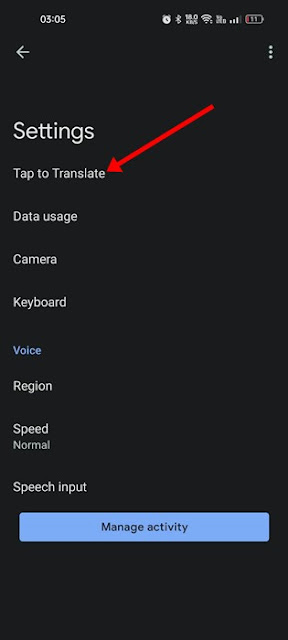
4. On Settings, tap the Tap to Translate option.

Google Translate Settings

5. On the Tap to Translate screen, enable the toggle for:

  • Use Tap to Translate
  • Show floating icon
  • Auto-translate copied text
Settings

6. Now open WhatsApp and select the conversation where you want to translate text.

7. Long press on the text to select it. Once selected, tap on the floating Google Translate icon.

WhatsApp

8. This will open Google Translate in a floating window. You can see the text translation, switch languages, make Google Translate speak the text, etc.
Google Translate


Protect Your Privacy online With This Simple Steps


How To  Protect Your Privacy online
In today's digital landscape, where personal information has emerged as a highly sought-after asset, the significance of privacy is paramount. Daily, countless individuals inadvertently provide their data to major technology companies in return for ease of use. However, one must consider the implications of this exchange .

If you have ever felt uneasy about the extent of Google's knowledge regarding your personal life, you are not alone. During this Cyber Security Awareness Month, Proton encourages you to reclaim your online privacy and reduce your reliance on Google.

For just $1 for your initial month, you can transition to Proton’s array of privacy-centric services—such as email, calendar, VPN, password manager, and more—that deliver exceptional security while safeguarding your personal data . 

Why Consider Reducing Your Dependence on Google?

While Google offers undeniable convenience, its business model is fundamentally based on the accumulation of your data to support targeted advertising. Every search, email, and even your geographical location when utilizing Google Maps contributes to a comprehensive personal profile that the company constructs about you. This information is often shared with third parties, including advertisers, without your awareness or explicit permission.

While Google provides various services at no charge, it is important to recognize that users are essentially compensating the company with their digital identities. The more information Google gathers about an individual, the greater the financial benefit to the company. Although this arrangement may seem like a necessary compromise for the sake of convenience, there exist more secure alternatives that do not compromise user privacy.

The Risks Associated with Google's Data Collection

Over 3 billion individuals depend on Google products to navigate their digital experiences. However, this extensive user engagement comes with a considerable price: the erosion of privacy. Google's methods of data collection have sparked privacy controversies and legal challenges worldwide, yet the technology giant has largely managed to avoid enduring repercussions by opting for settlements in lawsuits .

From monitoring your online behavior to retaining your personal data, the potential dangers extend beyond merely receiving more personalized advertisements. Issues such as data breaches, governmental surveillance, and the utilization of user data for AI training represent just a few of the concerning ways in which your information may be misused. In essence, your online activities should remain private and solely for your own viewing . 

 Proton: An Enhanced Alternative

Proton offers a straightforward and user-centric solution for safeguarding your privacy. In contrast to Google, Proton is meticulously crafted to prioritize the security of your data. Its encryption-centric methodology guarantees that no individual, including Proton itself, can access your confidential information. With its headquarters situated in Switzerland, Proton benefits from some of the most stringent privacy regulations globally, providing users with added reassurance.

Proton’s comprehensive range of privacy-oriented products encompasses all the vital digital services you require—without any invasiveness:

- Proton Mail: With end-to-end encryption, Proton Mail ensures that only you and your intended recipient can access your emails.
- Proton Calendar: Maintain the confidentiality of your schedule with encrypted access, even on mobile devices.
- Proton VPN: Protect your online activities with high-speed, encrypted VPN services that do not track your usage .
- Proton Drive: Safeguard your files and cherished memories in encrypted cloud storage, sharing them exclusively with trusted individuals.
- Proton Pass: A password manager designed to keep your login credentials secure from unauthorized access.

All Proton offerings are devoid of advertisements, and even the free tier provides substantial security features. Should you wish to access additional functionalities, upgrading to a paid plan not only enhances your overall experience but also contributes to the mission of fostering a more private internet.

Google

1. The prospect of transitioning away from Google may seem intimidating; however, Proton simplifies this process significantly. Utilizing its Easy Switch tool, users can effortlessly transfer their emails, contacts, and calendar events from Google to Proton. This entire procedure requires only a few clicks, enabling you to transition away from Google without encountering any technical difficulties .

This tool is beneficial for freelancers, students, and business owners alike, facilitating a move to a more secure digital landscape.

Swiss Privacy at Its Finest

Proton operates under the stringent privacy regulations of Switzerland, ensuring that your data remains protected from unauthorized access. In contrast to Google, which may be obligated to disclose user information to governmental entities under U.S. legislation such as the Foreign Intelligence Surveillance Act, Proton safeguards your information from unwarranted scrutiny.

This commitment to neutrality, along with Proton’s open-source and independently audited applications, guarantees that your trust is not merely promised but earned .

Safeguard Your Data and Experience Genuine Freedom Online


Privacy is an essential human right, and Proton is dedicated to upholding this principle. With Proton, you can experience digital freedom without the anxiety of being monitored, tracked, or manipulated. Proton’s array of services is tailored for anyone seeking to regain control over their data—whether you are an individual weary of targeted advertisements or a professional aiming to secure sensitive information .

Thus, whether you are composing an email, organizing your calendar, or sharing crucial documents, Proton is here to assist you. This October, in celebration of Cyber Security Awareness Month, Proton is offering an exceptional opportunity to switch. For just $1 in your first month, you can access the full range of Proton’s privacy-centric services and permanently distance yourself from Google. 

Transition to Enhanced Security Today

In an era where digital presence is paramount, now is the ideal moment to safeguard your online privacy. Do not postpone until your data is at risk.

Proton provides the necessary resources to effortlessly and confidently protect your online activities. Become part of the community of over 100 million individuals who rely on Proton to secure their information, and enjoy an internet experience that is private, secure, and free from unwanted interference.