
Showing posts with label network tricks. Show all posts

How To Read WhatsApp Message Without The Sender Knowing


WhatsApp

As we are all aware, when a message is sent to you on WhatsApp, the sender receives a notification or delivery report in return. Numerous users prefer not to disclose that they have viewed or read the message they received on WhatsApp. If you wish to read WhatsApp messages without the sender's knowledge, here are the steps you should follow.

1. Read the Message from the Notification Drawer
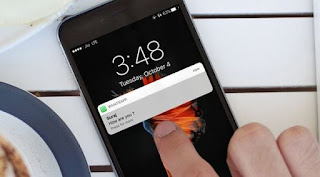

If you have enabled WhatsApp notifications, you can view messages directly from the notification drawer without launching the app. This method ensures that the sender remains unaware that you have read the message. However, please note that the notification panel only displays a limited number of characters from the WhatsApp message. If the message is lengthy, this approach may not be effective .

2. Using Flight Mode

To maintain your privacy, the next time you receive a message, activate Flight Mode or Airplane Mode on your smartphone before opening or reading the message on WhatsApp. Once Flight Mode is activated, you can access your unread message in WhatsApp and read it as many times as you wish without the sender being informed.

3. Disable the Read Receipts

WhatsApp provides the option to disable or enable read receipts. Turning off read receipts appears to be the most straightforward and authentic method to conceal your read status. However, the downside of disabling read receipts is that you will not be notified if someone has read your messages.

To disable Read Receipts, open WhatsApp and go to Settings > Privacy . Uncheck the read receipts option.

4. Use Third-party apps

Third-party apps like Beeper allow you to view disappearing messages more than once.
However, the older version of the app has the feature to read WhatsApp messages without giving away the read receipt.

Other than Beeper, you can use WhatsApp Mods to view WhatsApp messages without them knowing. But the use of WhatsApp Mods can lead to an account ban.
These are the only ways to read WhatsApp messages without them knowing. If you have any doubts, let us know in the comment box below. 


How to prevent Data Leaked

Data Was Leaked.

Your Data Was Leaked: Here's What Hackers Hope You Don't Do Next

You just received an email or a notification in your banking app. Your data was leaked. This is no longer a rare event or a worst-case scenario. In 2024 alone, the Identity Theft Resource Center tracked thousands of compromises exposing millions of records. Security experts agree that for the average person, it is not a matter of if your information will be exposed, but when.

The immediate reaction is often panic or, conversely, a sense of resignation. You might feel the urge to delete the email and carry on with your day. This is exactly what the hackers want. They rely on your inaction. They need you to wait and see, hoping the breach was not that bad. By delaying your response, you give attackers the window of opportunity they need to turn stolen data into profit.

The Hacker's Playbook: Exploiting Post-Leak Panic

Data breaches are not always about immediate, dramatic theft. They are often about speed and efficiency. When your information hits the dark web, criminals do not look at it one entry at a time. They use automated scripts to test that data across the web.

Exploiting the "Wait and See" Mentality

Many people ignore breach notifications because they assume the attacker only got their email address or a non-sensitive username. They think that if they have no money in the account, the hacker will move on. This is a mistake.

Hackers often target inactive accounts to use as launchpads. A dormant email account can be used to reset passwords on other, more secure platforms. They might use your name and email to sign up for accounts that create liability for you later. The longer you wait to secure your accounts, the more time they have to explore your digital history.

The Urgency of Credential Reuse

Most users rely on a small handful of passwords for almost every service. If you use the same password for your email as you do for a retail site, a grocery app, or a streaming service, you are vulnerable.

When your password appears in a dump, hackers immediately perform "credential stuffing" attacks. They use bots to try your email and password combination on high-value targets. They will test your login against major banks, cryptocurrency exchanges, and social media platforms within seconds of receiving the data. Changing the password on the breached site is not enough. You must change it everywhere you used that same password.

Phishing Campaigns Tailored to Your Leak

Leaked data often includes more than just passwords. It frequently contains your physical address, phone number, employer history, or recent purchase dates. This is a gold mine for spear phishing.

Instead of a generic email claiming your bank account is locked, you might receive a message that references your specific bank branch or a recent company expense report. This level of detail makes the scam difficult to spot. When a message contains accurate personal details, your skepticism drops. Hackers use this familiarity to trick you into clicking malicious links or downloading attachments.

The Critical First 48 Hours: Immediate Damage Control

If you confirm that your data was leaked, the first two days are vital. Do not wait for a second notification or for someone to tell you what to do. Take control of your accounts before an attacker can.

The Non-Negotiable Password Reset Cascade

Start with your primary email account. This is the master key to your digital life. If a hacker gains access to your email, they can reset the passwords for your bank, your social media, and your cloud storage.

  1. Change your email password: Use a long, unique phrase.
  2. Audit your email settings: Check for unauthorized forwarding rules that could send password reset links to an attacker.
  3. Cascade the resets: Change the password on any high-value account that shared the same password.
  4. Use a manager: If you struggle to remember unique passwords for every site, a password manager is your only real solution. It creates and stores complex, unique passwords for every single login.

Activating Multi-Factor Authentication (MFA) Everywhere

MFA is your strongest shield against stolen credentials. Even if a hacker has your password, MFA stops them at the door. However, not all MFA is created equal.

SMS-based authentication (where you get a code via text) is vulnerable to SIM swapping, where attackers convince your phone carrier to move your number to their device. Where possible, use an authenticator app like Google Authenticator or a hardware security key. These methods generate codes on your device, ensuring that the attacker must have physical access to your phone or key to get in.

Placing Fraud Alerts vs. Freezing Credit

If the breach involved sensitive information like your Social Security number or financial data, act immediately. You have two main options:

  • Fraud Alert: This notifies the three major credit bureaus (Equifax, Experian, TransUnion) that you may be a victim of identity theft. Creditors must verify your identity before opening new accounts. It lasts for one year and is free.
  • Credit Freeze: This is a stronger option. It locks your credit report entirely. No one, including you, can open a new credit account in your name unless you temporarily lift the freeze. It is free and prevents hackers from taking out loans or credit cards in your name.

Always start with a freeze if sensitive PII (Personally Identifiable Information) was part of the breach.

Beyond Passwords: Protecting Sensitive Identity Assets

Passwords and financial accounts are high-value targets, but they are not the only things at risk. Identity thieves are patient. They often hold on to data to use months or years later.

Monitoring for Synthetic Identity Fraud

If your Social Security number or date of birth leaked, you face the long-term threat of synthetic identity fraud. In this scheme, criminals combine your real information with fake details to create a new, "Frankenstein" identity.

This is harder to catch than simple account theft. It does not show up as a charge on your existing credit card. You must check your credit reports directly from all three bureaus at least twice a year to look for accounts you do not recognize.

Reviewing Account Recovery Questions and Security Settings

Many people use common knowledge for security questions, such as the name of their first pet or the street they grew up on. This information is often publicly available on social media.

If your data was leaked, assume those answers are compromised. Go into the security settings of your sensitive accounts and change your recovery questions to answers that have no basis in reality. Use a password manager to store these "fake" answers as if they were passwords.

Examining Connected Third-Party Apps

Many of us sign into services using our Google, Facebook, or Apple accounts. This is convenient, but it links your access. If you used your Google account to log into a small, insecure website that was later breached, that third-party site might still have persistent access tokens to your main account.

Review the "Connected Apps" or "Security Dashboard" settings in your major accounts. If you see an app you no longer use, revoke its access immediately. Removing these connections minimizes the blast radius if one of your peripheral accounts is compromised.

The Long Game: Continuous Vigilance and Recovery

Security is not a single project you finish in a weekend. It is a habit you build over time.

Setting Up Comprehensive Monitoring and Alerts

Many companies offer free credit monitoring after a breach. Use it, but do not rely on it as your only source of truth. Scrutinize your bank and credit card statements for small, unusual transactions. Thieves often make a tiny test charge of a dollar or two to see if an account is active before attempting a large purchase.

Documenting Everything for Future Disputes

If you discover actual fraud, you need a paper trail. Keep copies of the initial breach notification, all correspondence with the company, and logs of every step you took to secure your accounts. If you eventually need to file a claim with the IRS or a bank regarding stolen funds, having this documentation will significantly speed up the resolution process.

Rebuilding Trust in Digital Habits

Use this event as a trigger to overhaul how you handle your digital life. Start using a separate email address for your work and your personal accounts. Stop sharing excessive personal details on social media where they can be scraped.

The goal is to increase the cost for the attacker. Hackers look for the path of least resistance. If you force them to work for access by using unique passwords, hardware-backed MFA, and active monitoring, they will likely move on to someone else.

Inaction remains the attacker's greatest ally. Once the alarm rings, your move is to lock your credit, reset your passwords, and audit your connections. Security is an ongoing cycle of verification. By accepting this, you move from being a target to being a difficult mark.

How to Block Websites using Firewall

Block Websites
You can prevent access to distracting websites by establishing a straightforward firewall rule. Below, we provide a detailed guide on how to block websites using Windows Firewall.

1. Determine the IP Address of the Website

The initial step involves identifying the IP Addresses of the websites you wish to block. For instance, if you intend to block Facebook, you must locate its IP Address.

Finding a website’s IP Address is quite simple. To do this, you can utilize services such as IPVOID. Here are the steps you should follow.

1. Navigate to IPVOID using your web browser.

2. Input the website name in the designated text field and click on the Find Website IP button .
 
Block-website
3. The site will list the IP Address. You need to note down the IP address.

Block-website
2. Establishing a Firewall Rule to Restrict Access to Websites

After obtaining the IP Address, it is necessary to establish a Firewall rule to restrict access to websites.

1. Launch the Windows 11 search function and enter Windows Firewall. Select Windows Firewall from the displayed options .

 
Block-website
2. On the Windows Defender Firewall, click on the Advanced Settings.

Block Websites

 3. On the left pane, click on the Outbound Rules.

Block-website5


4. On the right pane, click on the New Rule button.

Block-website

5. On the Rule type pop-up, select Custom and click on Next.

Block-website-7

 6. Select all programs and click on the Next button on the next page.

7. Don’t make any changes to the Protocol and Ports option. Just click on Next.

Block Websites


8. On the Remote IP Addresses field, select the These IP Addresses checkbox.
 
Websites
9. Click on the Add button and add the IP Addresses you have copied. You need to enter every IP Address. Once you have done this, click on the Next button.

Block Websites

 10. On the Action page, select Block the Connection and click Next.

Block
11. On the Profile page, select all three options and click Next.

Block Websites


 12. Enter the name & description of the new rule and click on the Finish button.


If you try to access the blocked website, you will see a page like this .


 Alternative Methods for Blocking Websites on Windows 11?


If you are utilizing the Google Chrome web browser, there are various extensions available that can assist in blocking websites. Extensions such as Block Site and StayFocusd are particularly effective in preventing access to distracting websites .

As another option, you can modify the Hosts file on Windows 11 to restrict access to sites that you prefer to avoid.

For a comprehensive guide on how to block a website using the Hosts file, as well as instructions on utilizing website blocker extensions, please refer to this guide – Block a Website in Chrome.

Although the process may seem extensive, it is straightforward to execute. Should you have any questions regarding this matter, please feel free to reach out in the comment section below.

4 Signs That Your Android Apps Are Tracking You

Android Apps

The unusual battery depletion or unexpected data surge may not simply be a malfunction. It is possible that a rogue application is covertly monitoring your location, behaviors, and additional information. These intrusions are frequently discreet, yet there are distinct indicators that suggest your phone is under surveillance.

Apps Ask for Permissions They Don’t Need 

Permissions
The most evident warning sign that an application may be engaging in questionable practices is when it requests permissions unrelated to its intended function.

For instance, if you download a flashlight application, its primary purpose should be to activate your phone’s LED light. However, if during the installation process it requests access to your contacts, microphone, and location, this raises significant concerns. What reason would a flashlight app have to know your contacts or your whereabouts?

This type of excessive permission request is more prevalent than one might assume. Certain applications seek extensive access to data merely because they are able to do so. Occasionally, this is for the purpose of collecting analytics, but at times, it is to sell your information to third parties for advertising or profiling purposes.

Prior to installing a new application, it is advisable to scrutinize the permission requests thoroughly. Additionally, you can assess app permissions retrospectively. Verify which applications have access to sensitive features such as your location, microphone, and background data. Subsequently, revoke access for any application that lacks a valid justification. If you would not share your daily schedule with a stranger, do not provide it to a free puzzle game either.

Your Battery Is Draining Faster Than Usual 

Battery Is Draining Faster
Your phone's battery is depleting by noon, despite the fact that your usage habits have not changed. You are not engaging in gaming, streaming, or excessive scrolling, yet your battery struggles to last.

This may indicate that an application is operating quietly in the background. Tracking applications frequently remain active, utilizing your GPS, synchronizing with servers, or even capturing audio snippets—all of which contribute to battery drain.

Examine your battery usage statistics. If you observe an unfamiliar or rarely used application at the top of the list, it may be performing more functions than it advertises. Disabling background activity or completely uninstalling the application can often resolve the problem, and it will also enhance your battery performance.

The Location Icon Pops Up for No Reason 

You may be casually checking your messages or surfing the web when suddenly, you notice the location icon appearing in your status bar. You are not utilizing Maps, you are not hailing a ride, and you certainly did not ask for directions.

That unexpected pin icon is more than just a slight inconvenience. It indicates that something is actively monitoring your location. On Android devices, this suggests that an application has triggered your phone's GPS system, which could be a significant warning sign.

Indeed, certain applications such as delivery or weather services require your location. However, it is advisable to investigate if the icon shows up even when you are not using any location-based services. Some applications can access your GPS without being open, enabling them to collect and sell your location information to advertisers. Others may compile location data to analyze your frequent visits and daily routines.

This is why I suggest that everyone should examine their location settings and determine which applications have access to their phone's GPS. Adjusting permissions to "Only while using the app" whenever feasible is always a prudent decision. Additionally, you can completely revoke access for applications that do not require your location to operate.

For further reassurance, you can also check a log of applications that have recently accessed your location, allowing you to monitor potentially dubious applications more effectivel y. 

Data Usage Spikes Without a Clear Cause 

Data Usage Spikes
You are not streaming, downloading large files, or updating your applications. Nevertheless, your monthly mobile data allowance is depleting more rapidly than usual. If you have ever monitored your usage and questioned the disappearance of your data, it is possible that an application is utilizing it in the background.

Tracking applications frequently transmit data, including analytics and usage statistics, to remote servers without your awareness. This process is imperceptible to you but can quietly consume your data allowance .

A prudent approach is to examine the data usage of each application in your phone's settings. If an application, such as a calculator, is consuming hundreds of megabytes, it is advisable to investigate further. Consider limiting background data or adjusting the application's settings to restrict network access. In some cases, the most effective solution may be to uninstall the application and seek a more privacy-conscious alternative. Although this may be challenging, it is beneficial in the long term .

Your phone should not give the impression that it is monitoring you. If you have observed sudden battery depletion or unexpected data surges, it is not merely a figment of your imagination. These are indicators that your applications may be tracking you more than necessary. The positive aspect is that you can regain control. By making a few quick adjustments to your settings, you can safeguard your privacy while still enjoying your preferred applications.


eSIM vs. Local SIM

eSIMs

Selecting the appropriate SIM option while traveling involves more than just considering the cost: it encompasses flexibility, dependability, and the tempo of your journey. Certain locations favor spontaneity, while others require careful planning; however, with some foresight, you will consistently make the best decision upon arriving at a new destination .

When eSIMs Are the Better Choice 

eSIMs
At times, the most effective strategy is the one that allows you to maintain your momentum. eSIMs are designed for travelers who prioritize continuous movement, minimal obstacles, and staying ahead of the curve.

For Brief Journeys and Frequent Country Changes

If your travels are limited to a few days or if you frequently move between various countries, an eSIM is undoubtedly the simplest method to remain connected. You can set it up prior to your departure, bypass airport kiosks entirely, and begin utilizing data as soon as you arrive.

Regional plans encompass entire geographical regions instead of being confined to specific borders. Consequently, there is no necessity to switch plans while traversing different countries. This approach is quick, hassle-free, and ideal for maintaining your momentum during itineraries with multiple stops .

Choosing between plans may appear challenging, but you can easily evaluate your options by consulting eSIM websites prior to your journey, many of which provide an extensive array of data plans customized for various regions and countries.

If You Prefer a Swift Setup With Minimal Complications

Purchasing a SIM card in a country where you are not fluent in the language can be quite intimidating, to say the least. Some kiosks may require your passport, while others might only accept local payment options.

With an eSIM, you can avoid all of that stress. It is a completely digital installation, and the entire process occurs in your native language. There are no uncomfortable exchanges at the counter, no risk of obtaining a plan that limits your data at 1GB; just a simple procedure that could not be more straightforward .

For Dual-SIM Functionality and Flexibility 

 Recent smartphones allow the simultaneous use of both an eSIM and a physical SIM. This functionality enables you to maintain your existing number for two-factor authentication or emergency calls while utilizing a separate eSIM for data.

Choosing to incorporate an eSIM instead of replacing your physical SIM can prove invaluable, especially when an application sends an authentication code to your primary number while you are five time zones away from your home. Prioritizing an eSIM ensures that your main line remains accessible in the background.

When Enhanced Security and Remote Control Are Required

In terms of overall security, eSIMs offer greater safety compared to physical SIM cards. Unlike removable cards, eSIMs cannot be easily removed if your device is lost or stolen. This feature alone provides an additional layer of security when traveling in unfamiliar areas.

With contemporary devices, you have the ability to remotely lock or erase your phone, while the eSIM remains active, facilitating tracking or recovery. Furthermore, changing carriers or numbers can be accomplished digitally—eliminating the need for physical interaction with your device. This process is discreet, secure, and grants you enhanced control when it is most crucial.

When Local SIM Cards Make More Sense

Local SIMs come into their own when you need reliable coverage and a real connection to where you are. They tend to offer better prices, stronger signals, and access to services that eSIMs can't match. 

If You Are Residing in a Single Country for an Extended Period

Are you planning to stay in one location for a month or longer? It may be beneficial to adopt a local approach. Although travel eSIMs provide convenience, they frequently come with restrictions on data and elevated costs. Conversely, numerous domestic carriers offer physical SIM cards that come with substantial prepaid packages. These packages often include advantages such as unlimited data, local calls, or benefits specific to certain applications.

Local plans typically present better value, including daily data enhancements or time-sensitive packages that eSIM providers seldom match. For travelers who are staying long-term or are budget-conscious, the potential savings can be considerable.

For Enhanced Network Coverage

Despite the advancements in technology, there remain numerous reasons to purchase a phone equipped with a physical SIM slot. Since eSIM providers generally rely on existing networks, they often do not grant access to their full speeds or priority at cell towers. This can significantly affect connectivity in rural areas .

Local SIM cards—particularly those from leading national carriers—offer improved signal strength, quicker speeds, and may even provide superior customer support in case of issues. Mobile network providers in less populated areas often prioritize their own SIM users when distributing bandwidth or servicing towers during outages.

When You Require a Local Phone Number

Certain travel eSIMs are limited to data usage, which may suffice for applications like WhatsApp, Telegram, or Google Voice. However, if you require a local number for services such as delivery applications, bank verifications, or hailing a taxi in areas without Wi-Fi, opting for a local SIM is a more practical choice. 

In many countries, a local number is also tied to digital identity systems—used for tax IDs, residency applications, and even boarding a bus. Without one, traveling locally or settling in long-term can become significantly more difficul t. 

Fortunately, you don't need to pick a side forever. I've bounced between eSIMs and local SIMs depending on where I'm headed and how long I'm staying. The real strength lies in adapting to your specific situation.

Traveling smart isn't always about choosing the cheaper or faster option; it's about knowing when to use each tool. Choose based on context, and you'll stay connected no matter where you are.

5 Working Free Fake Email Generators

Fake Email Generators
Providing a personal email address on every website you visit is unwise, as it leads to spam and heightens privacy concerns. To protect yourself, consider utilizing fake or disposable email addresses.

Disposable emails are temporary addresses that are automatically deleted after a few minutes, hours, or days. These temporary emails can be employed for signing up on various online platforms, services, and applications. Therefore, if you are looking to discover the top temporary email services, you have come to the right guide .

This article presents a selection of the finest fake email generators, capable of producing temporary, disposable, or fake email addresses in mere seconds.

1. Temp Mail

Temp-Mail
Temp Mail stands out as one of the premier free email address generators available today. This free email generator safeguards your privacy by supplying you with a fictitious email address for your use.

Once you obtain a temporary email from Temp Mail, you can utilize it to register on numerous websites, applications, and services. A notable advantage of Temp Mail is that its email addresses are recognized by well-known sites and services.

This fake email generator can be employed to register on dubious websites. Temp Mail is completely free and devoid of spam.

2. Emailfake

Emailfake
Emailfake is a distinctive email generator currently available for use. One of the advantages of this disposable email generator is its ability to create a temporary email address that includes your name.

The platform enables you to choose a username or domain, allowing you to generate an email address that incorporates the terms you have specified.

However, a notable limitation of Emailfake is the absence of a dedicated inbox. All emails sent to your address are shown on the email generator page, which means that anyone who possesses your email address can view your messages .
 

3. Generator.email

Generator.email_
 Generator.email serves as a temporary email generator that allows you to create a temporary email address. You can utilize Generator.email to generate an email address for purposes such as confirming your email, registering on a website, or signing up for a social networking platform, among others.

One of the most advantageous features of Generator.email is its ability to automatically display all incoming emails, eliminating the need for constant reloading. The interface is user-friendly, making the process of generating a temporary email exceptionally straightforward .

Nevertheless, a significant limitation of Generator.email is that all of its email aliases tend to resemble spam, and its email addresses are often blocked on widely used websites and applications. Therefore, it is advisable to restrict the use of temporary mail to dubious websites only.

4. 10-Minute Mail

10-Minute-Mail
10 Minute Mail is recognized as one of the premier providers of temporary email services. It offers temporary email addresses to safeguard your privacy. By using 10 Minute Mail, you can create an email address that helps you avoid spam and unwanted messages in your primary inbox.

The platform automatically generates a disposable email address for users, with each address remaining valid for a duration of 10 minutes. During this 10-minute window, you can utilize the address to register for various applications and services .

There is no requirement to register with 10 Minute Mail in order to create an email address; additionally, you have the option to reset the timer to prolong the validity of your email address.


5. YOPmail

YOPmail
YOPmail is an excellent free and feature-packed fake email generator available for use today. This generator safeguards your privacy and assists in managing email spam by offering a disposable email address.

The website's user interface is quite clean and well-structured. It does not require any registration or password. All emails sent to your disposable email address will appear in the YOPmail inbox.

One of the advantages of YOPmail is that it retains your email messages for a duration of 8 days. After this period, all messages are automatically removed from its server.


How To Block Websites Simple method s

block website
By default, Chrome does not permit the blocking of any website; however, there are several methods available to block websites on the Chrome browser. Below, we present some of the most effective ways to block any website on Google Chrome.

Block a Website from your computer

The most effective method to prevent access to a particular website is by modifying the hosts file. Below are the steps to block websites utilizing the Hosts file on Windows.

1. Launch File Explorer and proceed to the Windows > System32 > drivers > etc directory.

Find-the-Hosts-file-in-Windows

2. Click the View button on the top bar and select Show > Hidden items.

3. Double-click on the hosts file and select Notepad to open it.

Edit-hosts-file

 4. Suppose you wish to restrict access to facebook.com. To accomplish this, insert a line at the end of the hosts file. The line that should be added is:


Edit-hosts-file-
5. Click the File > Save button to save the host file.

Edit-hosts-file-3
6. You are permitted to include an unlimited number of websites in the hosts file. Ensure that the web address in the hosts file is listed after 0.0.0.0

7. To restore access to the website, remove the line from the hosts file and save the changes. As an alternative, you may prepend a # to the start of the line, which will change the syntax to a comment, thereby unblocking the site.
 
Edit-hosts-file-4
You can block websites on your computer using the hosts file. The websites you will block using the hosts site won’t load in any web browser.

Utilizing the Firewall on Windows 11 to Block Websites

You can also employ the Windows 11 Firewall to restrict access to websites in your Chrome browser. Simply establish a firewall rule to block specific websites.

The advantage of this approach is that you can include as many websites as you desire in the block list. Please refer to our guide on how to block websites using the Firewall in Windows to effectively block your desired websites.

Blocking Websites with the Block Site Extension

This extension is regarded as one of the most effective website blockers for Chrome. It assists users in maintaining focus by preventing access to distracting sites.

With the Block Site extension, you can conveniently block any distracting or harmful websites. Below are the steps to utilize the Block Site extension for blocking specific websites in Chrome.

1. Download and install the Block Site Google Chrome extension from the provided lin k. 

Block Site Google Chrome extension

2. Once downloaded, the browser will show a pop-up. Click on Add Extension.

Using-Block-Site-Extension-696x361

3. Once added, you will see the Block Site icon.

4. Visit the site that you want to block. Click on the icon and then select Block This Site.


Using-Block-Site-Extension-3-696x313
5. To unblock the site, click on Edit block sites list. Each of your blocked sites will now have a minus icon. Click on the minus icon to unblock the site.

Using-Block-Site-Extension-4

 This is how you can use the Block Site Chrome extension to block certain websites from the Google Chrome browser.

5 Tips to Avoid Phishing Scams


Phishing Scams
Phishing attacks are prevalent yet often easily identifiable. I consistently assess phishing detection capabilities using actual examples and possess all the necessary information to prevent falling victim to scams. I have been evaluating security software for over three decades. In my assessment of antivirus applications, I ensure they effectively eliminate known malware and successfully defend against emerging threats. Additionally,

 I rigorously test their capacity to identify phishing schemes using real-world examples. The reason for this is that a phishing attack does not need to bypass the operating system or evade your antivirus; it merely needs to deceive you, the unsuspecting user. Crafting a webpage that mimics your bank's site is relatively straightforward compared to developing a new ransomware attack. To avoid becoming a victim, it is essential to recognize the signs that reveal these fraudulent attempts .

How Do Phishing Scams Work?

The fundamental aspect of executing a credential-harvesting phishing scheme involves crafting a replica of a secure website that is sufficiently convincing to deceive a majority of individuals, or at least a portion of them. The most sophisticated forgeries ensure that every pixel aligns with the authentic site, and all links direct to legitimate, accurate destinations, with the sole exception being the link that transmits your username and password to the criminals. 

To enhance the site's credibility, the scammers attempt to devise a URL that appears somewhat legitimate, opting for variations such as pyapal.com or paypal.security.reset.com instead of the genuine paypal.com. Phishing scammers can achieve success even with subpar skills; some counterfeit pages may utilize incorrect color schemes or otherwise fail to replicate the appearance of the original page accurately. Others feature absurdly unconvincing URLs, such as 1oglnperiodupdatejsesslonmalnusa.188-166-248-152.cprapid.com or lime-elysia-47.tiiny.site, both of which were actual URLs collected during my analysis. Remarkably, even these poorly executed fakes manage to ensnare a few victims, suggesting that the fraudsters continue their efforts for a reason.

When you input your username and password on a fraudulent website, the operators of that site gain complete control over your account. To maintain the illusion for as long as possible, they might relay your credentials to the legitimate site, making it appear as though you have logged in as usual. The first indication of trouble may arise when you discover your bank account is depleted or when you are unable to access your email, while your contacts report receiving spam messages from you. Therefore, what measures can you take to prevent being ensnared by this deception? 

1. Look for Obvious Phishing Sites

Certain fraudulent websites are so poorly designed that they fail to persuade any discerning observer. If you encounter a site that appears unprofessional, try refreshing the page by pressing Ctrl+F5, as the unsightly appearance may be a temporary issue. However, if the site continues to look unappealing, it is advisable to avoid it. Consider the aforementioned page: why are all the input fields misaligne d? 
Capital One

Most contemporary websites are designed to adapt to the dimensions of your browser window. With your suspicions now heightened, you are more likely to notice that the website's name in the address bar is marked as insecure. When constructing a phishing site, authenticity is crucial. Utilizing a free web hosting service that displays its banner on your page or includes its domain in your URL
AT&T

 is a clear indication of deceit. Nevertheless, during my phishing protection assessments, I frequently come across a few blatant fakes that show no effort, such as this one. Who would believe that AT&T operates on Weebly? 

2. Pay Attention to the Address Bar

Contemporary web browsers have shifted their emphasis away from the traditional address bar, evolving it into a search-plus-address bar at the very least. Nevertheless, the address bar remains a crucial tool for verifying the legitimacy of a webpage. 
Facebook

The most adept phishing detectors can identify a fraudulent URL almost instinctively. Sometimes, the deception is straightforward; few would mistake 'Placeboook' for Facebook. However, some scammers employ more sophisticated imitations, such as 'Arnazon' for Amazon. At the highest level of deception, they may incorporate visually similar foreign characters. Would you be able to distinguish between 'wellsfargo' and 'wellsfarÄ¡o'? Be vigilant for efforts to obscure the true domain part of the URL, which is the segment just before the final .com, .net, .org, etc. Anything preceding the domain is merely a subdomain. For instance, if 'fakery.paypal.com' were to exist, it would be a subdomain of 'paypal.com'. Conversely, if you encounter 'paypal.fakery.com', that is unequivocally a fraudulent site !  

Netflix
Phishing attacks targeting online storage accounts do not provide the same guaranteed rewards for criminals as obtaining bank login information. In contrast, individuals often do not exercise the same level of caution with these accounts. Online storage can contain a wide array of information, ranging from lists of Girl Scout cookie orders to confidential plans for a Mars mission. Similarly, while there may be limited financial gain from stealing login credentials for streaming services, such access could jeopardize more critical accounts that share the same login details. Observe the address bar in the image above; even if you manage to deceive a friend into providing their Netflix credentials, the URL will not display 'idiotfriend' in a legitimate Netflix link !

Xfinity

 The screenshot above reveals another anomaly. It is evident that the URL does not correspond to Xfinity, Comcast, or any associated brand. Furthermore, the browser is indicating a significant warning, highlighting that the site's security certificate has been revoked. While it is true that webmasters of legitimate sites may occasionally make mistakes and allow their certificates to expire, it is clear that this page is fraudulent.

3. The HTTPS Lock Is Important

The HyperText Transfer Protocol (HTTP), which serves as a fundamental communication system for the internet, is a remnant from the early era of the World Wide Web. It lacks security features because the potential for malicious activities was not anticipated during the internet's infancy. However, with the presence of cyber threats today, the most prudent method of connection is through the secure HTTPS protocol .

Facebook
Most web browsers, including Edge and Firefox, display a lock icon next to HTTPS URLs. However, starting a few years ago, Chrome adopted a different strategy. According to a Google study, nearly all websites accessed utilize a secure HTTPS connection. Consequently, Chrome has made HTTPS the default setting, prominently marking any HTTP connections with a large 'Not Secure' label. Regardless of how your browser indicates it, you should refrain from logging into any site that does not employ HTTPS.

It is important to note that even an HTTPS domain can be vulnerable if its security certificate is either compromised or expired. The URL presented above may appear nearly legitimate, yet the browser has flagged it as 'Not Secure.' Additionally, the HTTPS portion of the URL is crossed out and displayed in red. It is crucial to heed this warning and avoid such pages.
HTTPS
You might contend, 'What about a legitimate site that simply hasn't transitioned to a secure connection?' Unfortunately, I cannot accept that argument. In today's environment of ubiquitous HTTPS, there is no justification for a site to request your login information without utilizing HTTPS, even if it is not fraudulent; such a site cannot be considered legitimate.

4. Be on the Lookout for Email Scams

 It is a well-known guideline to avoid clicking on links in email messages from unknown senders. Additionally, it is advisable to refrain from clicking links in messages from known contacts, as their accounts may have been compromised. This advice is prudent, as clicking on an unfamiliar link could lead to a site that hosts malware or engages in fraudulent activities. When encountering a link that directs you to a login page, it is crucial to consider the legitimacy of the source. While it is possible to receive an email from your bank, many financial institutions prefer not to communicate in this manner.
Facebook
 If you find yourself redirected to a login page for a national or international bank after clicking a link on an unrelated website, it is likely a phishing attempt. In the event that your bank, the IRS, or PayPal genuinely needs to inform you about an issue with your account, the best course of action is to bypass the link and access the service directly through the usual login process. Additionally, exercise caution with emails or web pages that demand immediate action from you. For instance, a notification may claim that your Facebook account will be disabled unless you log in to rectify the situation. However, upon inspecting the Address Bar, it becomes evident that the site is not Facebook. In such cases, it is advisable to log into Facebook through the standard method; if the warning is legitimate, it will be displayed there.

5. Use Security Software

Outsmarting fraudsters and recognizing their clever tactics certainly provides a sense of satisfaction. However, your vigilance may wane over time, making it wise to seek assistance in combating phishing scams. Contemporary web browsers come equipped with built-in safeguards against deceptive websites, and they perform adequately. When you are about to visit a fraudulent site, they display a prominent red warning, as illustrated below.

Facebook

Many antivirus and security suite solutions incorporate their own defenses against phishing attacks. The most effective among them can achieve protection ratings as high as 100% in our evaluations. The following chart illustrates the effectiveness of the leading third-party phishing detection tools compared to the built-in protection offered by your web browser: Utilizing a password manager can also significantly reduce the risk of falling victim to phishing scams. Most password managers allow you to access secure websites and log in with a single click. If you inadvertently navigate to a fraudulent site, your password manager will not recognize it and will refrain from auto-filling your saved credentials, serving as a crucial warning sign. 

The most astute internet users employ a virtual private network (VPN) for their online activities. By routing your internet connection through a VPN, your data is safeguarded during transmission, as it is encrypted before reaching the VPN server. This also provides some level of protection against cyber-stalking, as your online activity appears to originate from the VPN server rather than your local IP address. However, it is important to note that using a VPN does not offer any defense against phishing attacks. When you submit your credentials to a phishing site, the method by which you accessed that site is irrelevant. Phishing attacks are designed to target you directly, rather than your devices or communication methods. Recognizing the Signs to Combat Phishing Phishing is more widespread than one might think. 

The images used in this article were captured during practical anti-phishing tests conducted for antivirus reviews. They were genuine at the time of testing, but they are likely no longer active. Fraudulent websites are quickly blacklisted, yet scammers continuously create new deceptive pages. Cybercriminals who engage in phishing schemes succeed because their victims fail to recognize the warning signs of deception. Now that you are aware of what to look for, you will be less likely to fall prey to such tactics. While it is advisable to utilize additional resources like password managers and the phishing detection features of your antivirus software, it is equally important to remain vigilant and identify any fraudulent activities that may evade detection. If a webpage appears suspicious, take the necessary precautions.

During the early days of the IBM PC, I held the position of president of the San Francisco PC User Group for a duration of three years. This role facilitated my introduction to the editorial team at PCMag, who subsequently invited me to join their ranks in 1986. Since that pivotal encounter, I have established myself as PCMag’s authority on security, privacy, and identity protection, rigorously testing antivirus software, security suites, and various security applications. Prior to my current focus on security, I provided PCMag readers with practical advice and solutions regarding widely used applications, operating systems, and programming languages through my columns 'User to User' and 'Ask Neil,' which commenced in 1990 and continued for nearly two decades. Throughout this period, I authored over 40 utility articles, in addition to writing 'Delphi Programming for Dummies' and six other books that addressed DOS, Windows, and programming topic s. 

I also conducted reviews of thousands of products, encompassing everything from early Sierra Online adventure games to Q-Link, the predecessor to AOL. In the early 2000s, I shifted my attention to security and the expanding antivirus sector. With years of experience in antivirus evaluation, I have gained recognition as an expert within the security industry. I currently serve as a member of the advisory board for the Anti-Malware Testing Standards Organization (AMTSO), an international nonprofit organization committed to enhancing the testing of anti-malware solutions.