Showing posts with label WhatsApp. Show all posts

7best Whatsapp Alternative

 
1.  WeChat - Wechat was very Successfull to establish into the market and one of the best Whatsapp Alternative anyone can find, You cannot only send audio Messages but now it has a feature to video chat as well, in my opinion Wechat will be the best alternative one can get for Whatsapp.
2.Skype - Skype allows you to text message people in your Contact list, it also allows you to make Calls. But unlike Whatsapp, inorder to add someone to your contact list you will have to add people by sending them request, Once they accept you as contact, you can have smooth Chats and Calls.
3.Kik - This app is pretty simple, Just register with your e-mail id, Choose your Username , Give it to your friends so that they can add you. Now you are good to go.
4.Facebook Messenger - Most of you must be aware about Facebook Messenger’s Existence. It is one of the Best Alternative one can get for Whatsapp. You can Chat with your friends who are already there in your facebook friendlist, The only problem one can face is people can’t chat with friends who are not on facebook,that doesn’t seems to be a problem because in today’s world even 10 year old child has a facebook account of his own.
5. ChatOn - ChatOn app is Created by Samsung but can be used on other platforms as well, Like whatsapp you have to verify your phone number and The Chat is On for you.
6.Line - Very similar to whatsapp, Apart from Free text messaging,Line has a feature which allows you can call your friends who are using Line over Internet Connection. You get more features in Line as compared to whatsapp so you can easily say it is a better Whatsapp Alternative that you can choose.
7.Viber - Unlike Whatsapp , You can even Call your friend provided your friend has Viber account and you have Internet Connection.

New WhatsApp Features'

WhatsApp

WhatsApp stands as one of the leading messaging and communication platforms available. To enhance user safety, Meta has consistently rolled out security and privacy enhancements for this application, with additional features recently introduced.

What Occurs in WhatsApp Remains in WhatsApp

Meta offers end-to-end encryption for WhatsApp users, guaranteeing that only the sender and recipient have access to their messages. Nevertheless, there may be occasions when the sender lacks complete trust in the recipient. To address such situations, WhatsApp is launching a new privacy feature known as Advanced Chat Privacy. This setting can be enabled in both individual and group conversations, ensuring that all communications within that thread remain confidential. Consequently, users will be unable to export, automatically download media, or utilize AI functionalities for chats where this feature is activated.
WhatsApp

Enhanced chat privacy is beneficial for safeguarding your information; however, WhatsApp offers additional features that can further enhance its security and privacy. For instance, when sharing sensitive information—such as your mother's maiden name—you can activate disappearing messages, eliminating the need for manual deletion once the recipient no longer requires the information. Furthermore, enabling two-factor authentication significantly reduces the risk of unauthorized access to your 

WhatsApp account. This means that even if someone gains control of your mobile number, they will still be unable to access your account without the PIN you have established within the app. To enable this feature, navigate to Settings > Account > Two-step verification, select Turn on, and you will be prompted to enter and confirm a six-digit PIN. After completing this process, your account will be considerably more secure against potential intruders.

Privacy and Security Features You Need the Most 

Enhanced chat privacy is essential for safeguarding your information; however, WhatsApp offers additional features that can further enhance your security and privacy. For instance, when sharing sensitive information—such as your mother's maiden name—you can activate disappearing messages, eliminating the need for manual deletion once the recipient no longer requires it. Furthermore, enabling two-factor authentication significantly reduces the risk of unauthorized access to your WhatsApp account. 

This means that even if someone gains control of your mobile number, they will still be unable to access your account without the PIN you have established within the app. To enable this feature, navigate to Settings > Account > Two-step verification, select Turn on, and you will be prompted to enter and confirm a six-digit PIN. After completing this process, your account will be considerably more secure against potential intruders.

Ultimately, you can protect the application on your device. Therefore, even if someone were to steal your phone or gain physical access to it, they would still require your biometric authentication to access WhatsApp. To enable this feature, navigate to Settings > Privacy > App lock, and then activate Require Face ID (or Touch ID) for iPhone or Unlock with biometric for Android devices. 

2 Best Ways to Translate WhatsApp Messages

WhatsApp
 

The ability to translate WhatsApp messages would be a valuable enhancement, particularly for those who interact with international clients. Although WhatsApp does not provide a built-in translation feature, there are several alternative methods that enable users to translate messages with ease. Below, we present a few straightforward techniques for translating WhatsApp messages. Let us begin

1. Translate WhatsApp Messages using Gboard

The simplest method to translate WhatsApp messages is as follows. For users of Android smartphones, Gboard serves as the default keyboard application. Below are the steps to translate WhatsApp messages on Android using Gboard.

1. If Gboard is not already installed on your Android device, please download and install the application. If it is installed, ensure that it is updated via the Google Play Store.

Gboard
2. Launch the WhatsApp app on your smartphone and open the conversation.
3. Long press on the text that you want to translate and tap on the three dots in the top-right corner.

WhatsApp
4. Select Copy from the list of options that appear. This will copy the text to the clipboard.
 
WhatsApp

5. Tap the WhatsApp message field. This will open the Gboard; tap the Menu button and select Translate.

WhatsApp
6. Paste the text you have copied. You will see the text getting translated into your selected language in real-time.

 
WhatsApp
7. You can easily change the translated language by tapping the output language button.

WhatsApp

2. Translate WhatsApp Messages using Google Translate

The Google Translate application can be found on the App Store for both Android and iPhone devices. One of the notable features of Google Translate is its ability to translate written texts, images, and spoken words. To utilize this application, follow these steps: 1. Download and install the Google Translate app on your mobile device.

1. Download & install the Google Translate app on your smartphone.

Google Translate
2. When the app opens, tap on your profile picture in the top-right corner.
Google Translate
3. Select Settings from the list of options that appear.
Google Translate

4. On Settings, tap the Tap to Translate option.
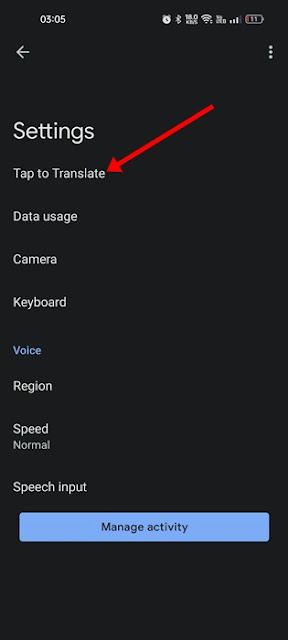
Google Translate Settings

5. On the Tap to Translate screen, enable the toggle for:

  • Use Tap to Translate
  • Show floating icon
  • Auto-translate copied text
Settings

6. Now open WhatsApp and select the conversation where you want to translate text.

7. Long press on the text to select it. Once selected, tap on the floating Google Translate icon.

WhatsApp

8. This will open Google Translate in a floating window. You can see the text translation, switch languages, make Google Translate speak the text, etc.
Google Translate


How to Identify Unknown Calls on WhatsApp

Caller ID for WhatsApp
Receiving messages or calls from unfamiliar numbers on WhatsApp is a common occurrence, particularly if you have shared your number across different platforms. Although it is not possible to entirely prevent unknown callers from contacting you, there are measures you can take to discern potential spam.

A straightforward method to recognize possible spam calls on WhatsApp is by utilizing a caller identification application such as TrueCaller. This application is capable of identifying unknown callers on WhatsApp.

What is TrueCaller?

TrueCaller is a caller identification application available for both Android and iPhone devices, designed to help users determine the identity of incoming calls even before answering.

The most recent version of TrueCaller includes a feature that can recognize unknown callers on WhatsApp. By using TrueCaller, you can ascertain who is attempting to contact you on your WhatsApp number .

How to Activate Caller ID for WhatsApp Number?

To enable Caller ID for WhatsApp, ensure you are using the latest version of the TrueCaller application. Follow these steps:

1. Download and install the TrueCaller app on your Android device.

2. After installation, complete the account registration process.

3. Once TrueCaller is set up, click on the three dots located at the top right corner of the screen.


TrueCaller-6

4. On the menu that appears, select Settings.

TrueCaller-5


5. On the TrueCaller Settings, select Calls.

TrueCaller

 6. On Calls, scroll down and enable the toggle for ‘Identify numbers on other apps’.

TrueCaller-3

7. Now, TrueCaller will ask you to grant notification permission. Simply grant the permissions that it asks for. 

TrueCaller-2

8. Next, scroll down and enable the ‘Show calls from other apps’ option.

Upon activation of the feature, TrueCaller will provide caller identification for WhatsApp calls specifically for incoming calls from unknown numbers.

Frequently Asked Questions:

Caller ID for WhatsApp – Is it applicable to all calls?

The caller identification feature for WhatsApp calls is limited to incoming calls from unknown numbers. It will not display caller ID for numbers that are already saved in your contacts.

Is it possible to use Caller ID for WhatsApp on an iPhone?

On the iPhone, TrueCaller’s caller identification feature functions seamlessly. To identify unknown callers on WhatsApp, simply enable the Live Caller ID feature.

Are there alternative applications that can identify unknown callers on WhatsApp?

While there are other caller identification applications available, they do not have the capability to identify calls received on WhatsApp. Only a select few, such as TrueCaller, offer this functionality.

Can TrueCaller block unknown callers on WhatsApp?

No, TrueCaller is limited to identifying unknown callers on WhatsApp. To block these callers, you must manually add their numbers to WhatsApp’s block list.

This guide outlines the process of identifying unknown callers on WhatsApp using the TrueCaller app. Should you require further assistance on this matter, please feel free to reach out in the comments. Additionally, if you find this guide beneficial, kindly share it with your friends.
 

How to Unblock Banned WhatsApp Account

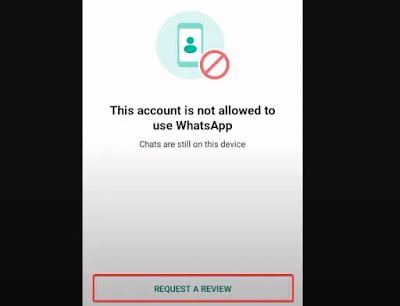
Is your WhatsApp account currently banned? Numerous users of WhatsApp encounter the issue of being blocked by the platform, often due to alleged violations of its policies. This ban manifests as a notification stating, “This account cannot use WhatsApp” or a similar message when attempting to access WhatsApp on your device.

While some bans may be warranted, there are instances where users find themselves unjustly blocked. This often occurs due to a false flag being raised against their accounts.

In preparation for this article, I spoke with several individuals whose WhatsApp accounts had been suspended. The majority reported that their accounts were blocked arbitrarily, without any direct infringement of WhatsApp’s policies on their part.

Why am I banned from WhatsApp?

If you find yourself in a similar situation, you can take straightforward steps to unblock your WhatsApp account by requesting a review. I will provide guidance on how to contact WhatsApp and initiate the unblocking process. However, before that, let us explore the reasons behind the blocking of WhatsApp accounts .

The primary reason for a ban on a WhatsApp account is typically a breach of the platform's terms and conditions. Below is a compilation of additional actions that may lead to your account being suspended:

1. Spamming: Sending mass messages to random users can result in a ban. WhatsApp has a strict policy against spamming, and recipients may report such behavior. Additionally, if your account has been compromised and used for spamming, this could also lead to a ban, as it is a frequent cause of account suspensions.

2. Multiple reports: If your account receives numerous reports from other users, WhatsApp may take action and impose a ban. It is crucial to be mindful of your interactions on the platform, as user reports can significantly impact your account status .

3. Engaging in suspicious activities: Actions such as creating multiple groups with unfamiliar contacts may also result in your account being banned.

4. Utilizing third-party WhatsApp applications: If your account is banned while using a modified version of WhatsApp, such as GB WhatsApp, it is likely due to the use of that application. WhatsApp actively bans users of these unauthorized versions to reinforce its policy against their usage.

5. Flagged phone identification: An often-overlooked reason for account bans is the flagging of your phone. If suspicious activity has been detected on your device, it may be flagged, leading to a ban on your WhatsApp account when accessed from that phone

Restoring access to a banned WhatsApp account can vary significantly in duration, ranging from a few minutes to as long as six months, contingent upon the nature of the ban. There are two primary types of bans: temporary and permanent, both of which can be contested with WhatsApp in an effort to have the ban revoked. It is important to note that some permanent bans may be irreversible.

A specific type of temporary ban is characterized by a countdown timer indicating when access to your account will be reinstated. In such instances, you need only to wait for the countdown to conclude, at which point your account and all associated chats will be restored .

To address a WhatsApp ban if you find yourself unable to access your account, follow these steps:
 

Method 1: Request a Review

In cases of certain WhatsApp bans, particularly temporary ones, you have the option to request a review. If you encounter a message indicating that your account is blocked, look for the option labeled REQUEST A REVIEW and click on it.

This action will initiate a review process by WhatsApp, which will examine your account alongside your device details to ascertain whether the ban was issued in error. After selecting the REQUEST A REVIEW option, you will be given the opportunity to provide additional information to support your case.

This step is crucial in enhancing your likelihood of recovering your account, especially if the ban was likely a mistake.

I have witnessed a situation where a user's account was suspended due to unauthorized access, as they had logged in on a different device. However, she successfully regained her account after submitting this information in her support request. 

Here’s an overview of the process of how you can unblock your WhatsApp by requesting a review:

1. On the banned WhatsApp page, click on REQUEST A REVIEW.

Request-a-Review WhatsApp
2. Next, write a concise explanation of how the ban came about and that you personally have not done anything that violates WhatsApp.

2. Next, write a concise explanation of how the ban came about and that you personally have not done anything that violates WhatsApp.

 3. Now click on Submit and wait a while before checking to see if the block has been lifted.


Restore-banned-WhatsApp

Here is a suggestion for the content you might include on the additional information page if you suspect your account was compromised prior to its suspension:

Dear WhatsApp Support, I am writing to contest the ban on my WhatsApp account, which I believe has been imposed in error. I have carefully reviewed your terms of service and am confident that I have adhered to them. Earlier today, I detected an attempt of unauthorized access to my account. Consequently, I kindly request that you reconsider the ban and restore my account, as it serves as my primary communication tool with family and friends.  
Please note that this is merely one example of how to frame your request. Depending on your specific situation, you may wish to formulate a similar message to ensure that WhatsApp support receives the pertinent information necessary for their review. 

Method 2: Reach Out to WhatsApp Help Center - Appeal

An alternative method to recover access to your blocked WhatsApp account is to submit an appeal to WhatsApp Support through the WhatsApp Help Center. This approach can prove to be quite effective, particularly if your account was erroneously banned and you are able to furnish the required information in your appeal. Below are the steps to file a complaint with WhatsApp support :

1. Navigate to the official WhatsApp website and choose “Help Center” from the menu located at the top of the page.

WhatsApp-Help-Center
2. On the Help Center page, scroll down and select Contact Us.

Contact-Us-WhatsApp-Support

 3. Select the "Contact Us" option once more, ensuring that you choose the appropriate category that matches the type of WhatsApp account that has been suspended.

4. Subsequently, on the Contact WhatsApp page, fill in all the required information, making certain that it is precise and linked to the suspended WhatsApp account.

5. In the section labeled “Please enter your message,” describe your suspended account, articulate the reasons you believe the suspension is erroneous, and request reactivation. It is important that your explanation remains clear and succinct, akin to the previous example.

Appeal-to-unban-WhatsApp
You may also send an email detailing your situation to support@whatsapp.com.

It is advisable to exercise patience and keep an eye on WhatsApp for any updates, as submitting this appeal may lead to the reactivation of your account either in the near future or within a timeframe of 3 to 6 months.

If you have successfully regained access to your WhatsApp account following a ban, here are several key recommendations to consider :

1. Reinstall WhatsApp: By reinstalling the application, you will eliminate all data linked to the flag that caused your account ban. It is prudent to undertake this step upon regaining access to your account to prevent future bans.
2. Transition to a new device: If your current device has been flagged, maintaining your account on that device may prove challenging. Therefore, it is advisable to switch to a new device.

Guidelines to Avoid Being Banned on WhatsApp

It is preferable to ensure that your WhatsApp account remains unblocked rather than seeking methods to unblock it. Here are several guidelines to help ensure your WhatsApp account is not blocked:

1. Familiarize yourself with WhatsApp’s Terms of Service and ensure adherence.
2. Avoid utilizing third-party WhatsApp applications such as GBWhatsApp and FMWhatsApp .
3. Refrain from spamming other users on the platform.
4. Do not add unfamiliar users to groups without their explicit consent.
5. Avoid engaging in inappropriate discussions on WhatsApp and refrain from harassing others or infringing upon their rights, as this may lead to reports against you.
6. Safeguard your account from potential hacking attempts.

Conclusion – Navigating the Recovery from a WhatsApp Account Ban

The reinstatement of your account is contingent upon the underlying reason for the ban and the severity of the situation from WhatsApp’s perspective. Nevertheless, the strategies outlined in this document have consistently demonstrated effectiveness in addressing the issue of WhatsApp account bans. It is crucial to meticulously follow each step provided.

In certain situations, immediate recovery of your account may not be possible, and the process for WhatsApp to lift the ban could take some time. In these instances, it may be advisable to create a new account or explore alternative messaging applications such as Telegram.

Furthermore, exercise caution regarding individuals who claim they can help you regain access to your WhatsApp account, as they are frequently associated with fraudulent activities .

FAQs Regarding Banned WhatsApp Accounts  
1. What is the typical duration of a WhatsApp ban?  

The duration of a WhatsApp ban can vary significantly, ranging from a brief period to six months or potentially longer. The length of the ban is generally influenced by the nature of the violation that led to the ban and your ability to successfully appeal to WhatsApp support.

2. How can I contact WhatsApp to request an unban?  

One approach to regain access to your WhatsApp account is to send an email to WhatsApp support at support@whatsapp.com. This email should contain comprehensive details regarding the incident that resulted in the ban, along with your request for reactivation. An example of the appeal format was provided earlier in this document.

3. What steps can I take to unban my GB number from WhatsApp ?  

The use of GBWhatsApp is not authorized by WhatsApp, which can result in your account being banned. However, in many instances, you may be able to recover your account by following the procedures outlined earlier in this article.