





The three types of methods we will use to make ourselves secure online are:
- TOR
- Proxies
- VPN
TOR
Tor, short form of The Onion Router is a system that offers you anonymity online. TOR clients redirects all your internet traffic through a network of computers concealing your actual location and preventing any tracking.
The TOR bundle comes with a firefox that’s integrated to the TOR
network and a GUI named Vidalia is used to use the TOR network. Here is
how Vidalia looks like:

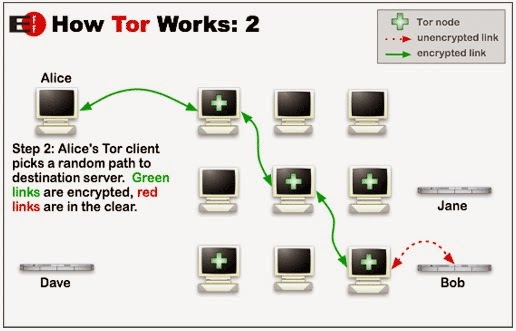
So once a route has been established, all kinds of data can be sent and received over the TOR network. And after a fixed amount of time, TOR changes the route through which you connect randomly which makes it very hard to trace back to you.

or is good, but it can’t completely secure you and your activity. While it protects the transported data, experts can use statistical analysis and get your circuit route and find out your location. Official Website: http://www.torproject.org
Download TOR Bundle: http://www.torproject.org.in/download/download-easy.html.en
PROXIES
A proxy or a proxy server is a computer system or application that
acts as an intermediary between you and your client server or
application. So you want to access a target, you connect to the proxy,
the proxy connects to the target, then it gets back the relevant
information to you.
So a proxy can be used to keep you anonymous, or to bypass IP restrictions, security/parental controls, or to get around regional restrictions. A proxy server appears as an IP address which you have to configure on your web browser to use it. When you do that, your original IP will be masked by the proxy and you will be anonymous.
190.96.64.234 – This is how a proxy looks like. All proxies are from a particular location or country so using a proxy near to your target server might help faster browsing too! If you’re on Firefox, you can set a proxy by going to Firefox Options > Advanced > Network > Connection Settings > Manual Proxy Settings.

VPN (Virtual Private Network)
A VPN or Virtual Private Network is a remote server
in an offsite location that tunnels all your data and information
through their secured servers by encrypting them thereby making your
connection secure. Most of the VPN’s use 128 bit SSL encryption or 256 bit SSL encryption. More
the bit count, better the encryption. VPN helps you hide your real IP
and spoofs your location to any programs or clients trying to track you.
So suppose you’re from USA and needs to access a website that’s for
Russia only, I could use a VPN located in Russia that masks my IP as a Russian one and thereby access the website.
Another matter of concern while using a VPN is logs. Almost all of the VPN providers keep logs as a security measure. This is done so that if they ever want to check up a user’s activity, they could refer to the logs. So federal agents or the government could contact the VPN providers and get your activity. Hence if you are really concerned about your security, you should purchase a VPN that do not keep logs. When you purchase a VPN, make sure you choose one which is closer to you since it will make your Internet experience smooth and won’t cause any lag or slowness.
There are lots of free VPN’s available but they’re not recommended since most of them come with lots of ads, adwares and slow connection. Most of them keep logs which mean you’re not really secure and the connection won’t be having a good encryption rate. So it is always recommended you get a paid VPN. But I’ll include some good free and paid VPN’s to help you out.
Free VPN
- HotSpotShield – http://www.hotspotshield.com
- VPNBook – http://www.vpnbook.com
- ProXPN – http://www.proxpn.com
- AnchorFree – http://www.anchorfree.com
Paid VPN
- nVPN – http://www.nvpn.net
- MicroVPN – http://www.microvpn.com
- InterVPN – http://www.intervpn.com
- VPNTraffic – http://www.vpntraffic.om
CONCLUSION
So that’s it. I’ve discussed some main methods by which you can be
secure online. But always remember, you’re never 100% safe. If the
federals or others want to track you, they can still do it no matter
what measures you’re using to prevent it. These methods will work, but
only up to a limit. The rest is up to you to use your intuition to keep
yourself safe.


 gg