

This is default featured slide 1 title

Go to Blogger edit html and find these sentences.Now replace these sentences with your own descriptions.This theme is Bloggerized by Lasantha Bandara - Premiumbloggertemplates.com.

This is default featured slide 2 title

Go to Blogger edit html and find these sentences.Now replace these sentences with your own descriptions.This theme is Bloggerized by Lasantha Bandara - Premiumbloggertemplates.com.

This is default featured slide 3 title

Go to Blogger edit html and find these sentences.Now replace these sentences with your own descriptions.This theme is Bloggerized by Lasantha Bandara - Premiumbloggertemplates.com.

This is default featured slide 4 title

Go to Blogger edit html and find these sentences.Now replace these sentences with your own descriptions.This theme is Bloggerized by Lasantha Bandara - Premiumbloggertemplates.com.

This is default featured slide 5 title

Go to Blogger edit html and find these sentences.Now replace these sentences with your own descriptions.This theme is Bloggerized by Lasantha Bandara - Premiumbloggertemplates.com.

Earn $70 per hour Online


Data entry

1.Data Entry Professional

Data entry clerks are responsible for transferring information from various sources, such as spreadsheets, printed documents, order forms, or other materials, into a different format, typically a digital one like a database, computer application, or spreadsheet .

online jobs

Their duties may also encompass verifying data and identifying errors. For instance, a company specializing in financial account processing might require data entry clerks to manually input or validate invoices and other billing documents for external clients. Many organizations seek to employ data entry clerks or keyers who possess a high school diploma, even if they lack prior work experience, on a full-time, part-time, or freelance basis.

Given that a significant portion of the data and information managed by companies today is digital, this role is frequently available as a work-from-home opportunity. Additionally, data entry tasks often do not need to be completed during standard business hours, making it an appealing option for individuals seeking flexible working hours .

 We are seeking new Data Entry Professionals for remote positions.

COMPENSATION

Earnings range from $35 to $70 per hour based on the complexity of the data entry tasks, with the potential to earn up to $4,500 monthly.

WORK ENVIRONMENT

This is a fully remote opportunity, allowing you to start immediately without any prior experience required.

REQUIREMENTS

Candidates must have access to at least one of the following devices: iPhone, iPad, Android Smartphone, or Android Tablet.

CONTRACT DETAILS

There is no fixed term for this position. You may work as little as one hour per day, provided you meet the minimum weekly hour requirement, which will be detailed further below.

SKILLS AND QUALIFICATIONS

Applicants should have access to a smartphone, tablet, or computer and be capable of articulating their personal opinions. The ability to work independently and adhere closely to provided instructions is essential. A minimum of five hours of availability per week and a reliable internet connection are required. Individuals of all ages are encouraged to apply .

WORKING HOURS: FLEXIBLE


This role offers the flexibility of online remote work. We are currently expanding our team of remote workers significantly due to increased demand.


2.Take Online Survey

 Increase Your Earnings

Generating income online with MBSMEDIA is both straightforward and enjoyable. This platform provides a complimentary and user-friendly environment where individuals with basic computer skills can respond to questions and earn money online. Anyone possessing fundamental computer knowledge can participate and enhance their income through MBSMEDIA.
Online Survey
There is no requirement for advanced expertise to engage in online surveys and complete them on this site. You can significantly increase your earnings simply by providing your valuable insights in response to questions. It is truly that simple. This presents an excellent opportunity to earn up to $3.50 for each response on this platform.

Who Can Benefit from MBSMEDIA?

Individuals without specialized knowledge can convert their opinions into income. MBSMEDIA, the premier platform for paid surveys, enables users to complete surveys on the go and earn real money directly from their mobile devices.

Whether you are a student or a retiree dealing with unforeseen expenses, saving for specific goals, or simply looking to earn some extra cash, this website provides opportunities for online work through paid surveys. We also welcome all online workers, including students, stay-at-home parents, and retirees seeking additional income from home.

Earn Money While Attending College

As a student, you can earn actual cash by completing surveys on this platform. Engage in paid surveys and share your opinions while in college or from any location .

Generate Income in Retirement

Retirees can earn money daily by sharing their thoughts on current topics from the comfort of their homes. Seniors can sign up on this platform and receive cash rewards instantly.

A Unique Income Source for Stay-at-home Parents

Stay-at-home parents often encounter unexpected expenses. You can earn real money simply by participating in engaging surveys on MBSMEDIA without any commitment.

Earning Made Simple

The process of earning with MBSMEDIA is easy and stress-free for all online workers. MBSMEDIA, the exceptional platform for paid surveys, allows you to complete surveys on the go and earn real cash directly from your phone.

You gain access to paid surveys for income generation without the need for prior registration.

 Here is a revised version of the provided text:

Now that you have acquired the skills to identify fraudulent opportunities, here is a compilation of online jobs that require little to no prior experience :

online jobs with no experience required

1. Data Entry Clerk

Average annual salary: $38,867

Data entry clerks are responsible for transferring information from various sources, such as spreadsheets, printed documents, or order forms, into another format, typically a digital one like a database or spreadsheet. Their duties may also involve verifying data and checking for inaccuracies. For instance, a company that processes financial accounts may require data entry clerks to manually input or confirm invoices and other billing documents for external clients. Many organizations are willing to employ data entry clerks or keyers who possess a high school diploma and lack prior work experience, offering full-time, part-time, or freelance positions.

2. Proofreader or Copy Editor

Average annual salary for a proofreader: $50,694  
Average annual salary for a copy editor: $55,535

Proofreaders and copy editors hold distinct roles, yet share a common objective: ensuring that written content is free of errors. Proofreaders typically serve as the final reviewers of a text before it is printed, published, or made available online, checking for grammatical mistakes, formatting issues, and typographical errors. Copy editors perform similar tasks but may also revise sentences or paragraphs to enhance accuracy and clarity.

Organizations that generate substantial written content may hire proofreaders or copy editors, either in-person or remotely, for part-time or full-time roles. Additionally, there are opportunities to work as a contractor or freelancer on a project-by-project basis.

To pursue a career as a proofreader or copy editor, a strong command of English spelling and grammar is essential.

3. Virtual Assistant

Average annual salary: $44,794

Virtual assistants typically engage in clerical or secretarial tasks. Their duties may encompass responding to emails and other communications, organizing meetings, drafting memos, managing databases and filing systems, as well as arranging travel and accommodations.

While a formal degree is generally not necessary, strong written and verbal communication skills are essential, along with effective time management, organizational abilities, and critical thinking. A virtual assistant should also possess a good level of technological proficiency, being adept at using various software applications, including Excel and PowerPoint, different email platforms, and other tools provided by the employer.

Explore online virtual assistant opportunities on The Muse.
 

4. Administrative Assistant

Average annual salary: $44,683

In a progressively digital environment, many administrative assistants are now able to perform their roles entirely online, whether on a full-time or part-time basis. However, it is important to note that not all administrative assistant positions are exclusively online; applicants should thoroughly review job descriptions prior to applying .

Administrative assistants generally undertake secretarial responsibilities such as data entry, billing, inventory management, record-keeping, correspondence, and accounting tasks. Consequently, proficient typing skills are essential, along with agility and critical thinking capabilities.

It is feasible to secure a position as an administrative assistant with only a high school diploma, although some employers may favor candidates with a college degree. Many roles in this field are entry-level, but certain employers might seek candidates with more extensive experience.


How to Identify Unknown Calls on WhatsApp

Caller ID for WhatsApp
Receiving messages or calls from unfamiliar numbers on WhatsApp is a common occurrence, particularly if you have shared your number across different platforms. Although it is not possible to entirely prevent unknown callers from contacting you, there are measures you can take to discern potential spam.

A straightforward method to recognize possible spam calls on WhatsApp is by utilizing a caller identification application such as TrueCaller. This application is capable of identifying unknown callers on WhatsApp.

What is TrueCaller?

TrueCaller is a caller identification application available for both Android and iPhone devices, designed to help users determine the identity of incoming calls even before answering.

The most recent version of TrueCaller includes a feature that can recognize unknown callers on WhatsApp. By using TrueCaller, you can ascertain who is attempting to contact you on your WhatsApp number .

How to Activate Caller ID for WhatsApp Number?

To enable Caller ID for WhatsApp, ensure you are using the latest version of the TrueCaller application. Follow these steps:

1. Download and install the TrueCaller app on your Android device.

2. After installation, complete the account registration process.

3. Once TrueCaller is set up, click on the three dots located at the top right corner of the screen.


TrueCaller-6

4. On the menu that appears, select Settings.

TrueCaller-5


5. On the TrueCaller Settings, select Calls.

TrueCaller

 6. On Calls, scroll down and enable the toggle for ‘Identify numbers on other apps’.

TrueCaller-3

7. Now, TrueCaller will ask you to grant notification permission. Simply grant the permissions that it asks for. 

TrueCaller-2

8. Next, scroll down and enable the ‘Show calls from other apps’ option.

Upon activation of the feature, TrueCaller will provide caller identification for WhatsApp calls specifically for incoming calls from unknown numbers.

Frequently Asked Questions:

Caller ID for WhatsApp – Is it applicable to all calls?

The caller identification feature for WhatsApp calls is limited to incoming calls from unknown numbers. It will not display caller ID for numbers that are already saved in your contacts.

Is it possible to use Caller ID for WhatsApp on an iPhone?

On the iPhone, TrueCaller’s caller identification feature functions seamlessly. To identify unknown callers on WhatsApp, simply enable the Live Caller ID feature.

Are there alternative applications that can identify unknown callers on WhatsApp?

While there are other caller identification applications available, they do not have the capability to identify calls received on WhatsApp. Only a select few, such as TrueCaller, offer this functionality.

Can TrueCaller block unknown callers on WhatsApp?

No, TrueCaller is limited to identifying unknown callers on WhatsApp. To block these callers, you must manually add their numbers to WhatsApp’s block list.

This guide outlines the process of identifying unknown callers on WhatsApp using the TrueCaller app. Should you require further assistance on this matter, please feel free to reach out in the comments. Additionally, if you find this guide beneficial, kindly share it with your friends.
 

How to Backup iPhone Without iCloud


Backup Your iPhone

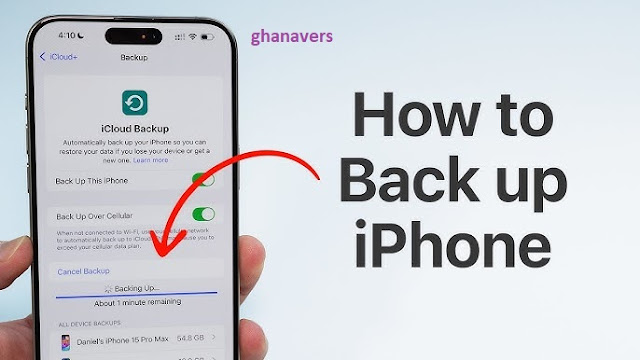
iCloud provides a convenient method for backing up data on your iPhone. Apple allocates 5 GB of complimentary iCloud storage, which can be quickly consumed when backing up photos, videos, and application data. Depending on the volume of your backup, it may be necessary to upgrade your iCloud storage, which will result in a monthly charge based on the selected storage capacity.

If you are seeking a free or cost-effective alternative to back up your iPhone without utilizing iCloud, this guide will assist you. You will discover how to back up your iPhone using free tools available on both Mac and Windows, as well as third-party applications, and by manually downloading data from your iPhone .

Methods for Backing Up Your iPhone Without iCloud


You can utilize the Finder application on a Mac or the Apple Devices app or iTunes on Windows to back up your iPhone without relying on iCloud. Additionally, numerous third-party software options are available that offer enhanced features, including selective backups and wireless backup capabilities. Furthermore, you can manually back up specific data types, such as contacts, photos, and documents, and store them locally on your iPhone.

1 .Backing up your iPhone using a Mac . 

The Finder application on macOS provides a built-in backup tool that allows you to create a comprehensive copy of your iPhone's data, encompassing applications, music, photos, videos, contacts, and more. Through Finder, you can easily view and manage your backup files, remove outdated backups, and transfer backups to external storage to optimize space on your Mac. Additionally, you can manage backups that were previously created with iTunes and set up automatic backups whenever your iPhone is connected to your Mac.

Instructions for backing up your iPhone via the Finder application on Mac:

Step 1: Connect your iPhone to your Mac using a USB cable. Upon the initial connection, grant your Mac permission to access the files on your iPhone and trust the Mac on your iPhone to enable data access. Follow the on-screen instructions to complete this process.  
Step 2: After establishing the connection, launch the Finder app and select your iPhone from the ‘Locations’ section.

iphone-in-the-finder-location
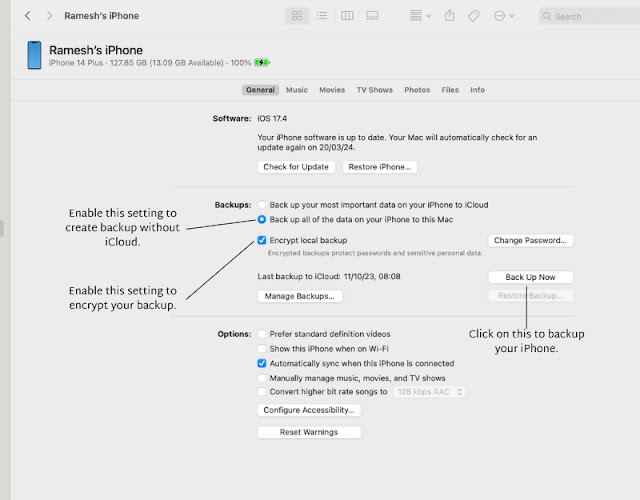
Step 3: In the ‘General‘ tab, go to the ‘Backups‘ section.
Backup-section-in-the-finder-tool

Step 4: Opt to back up all data from your iPhone to your Mac by selecting the option ‘Back up all of the data on your iPhone to this Mac.’ Additionally, you have the option to encrypt your backup. Enabling encryption ensures that all your passwords and sensitive information are included in the backup. It is crucial to remember the password you create for this purpose, as forgetting it will prevent you from accessing the backup. If you decide against encryption, please note that sensitive information such as passwords will not be included in the backup.

Step 5: Click on ‘Back Up Now.’ If prompted, please enter the password on your iPhone. The duration of the backup process may vary based on the size of the backup file.

backup-iphone-data

Step 6: You will receive a notification upon the successful completion of the backup process. To view your backups, select ‘Manage Backups.’ Please note that the new backup file will overwrite the previous one. If you wish to retain an older backup file, right-click on it and select ‘Archive.’ This action will safeguard the current backup from being replaced by subsequent backups.

Step 7: In the event that your Mac is low on storage, you have the option to transfer the backups to an external drive:

1. Connect an external drive to your Mac.
2. On your Mac, navigate to ~/Library/Application Support/MobileSync/Backup, where all backup files are located.
3. Copy the backup folders from your computer to the external drive.
4. After copying, you may delete the backups from your computer to reclaim disk space.

Step 8: To restore a backup, select the Restore backup option, choose the desired backup files, and proceed with the restoration. Ensure that your iPhone is connected to your Mac during the restoration process.
 

2.Windows: iTunes or Apple Device App

  The Apple Devices application is compatible with Windows 10 and subsequent versions. For users with earlier versions of Windows, iTunes serves as an alternative. Both options necessitate connecting your iPhone to your PC. Through these methods, you can create multiple backups, access backup data, encrypt the backup information, remove outdated backups, and transfer data to external devices to free up space on your device.

Instructions for backing up your iPhone using the Apple Devices app:

1. Download and install the Apple Devices app from the Microsoft Store, where it is available at no cost.
2. Launch the application, accept the terms and conditions, and click on Start.
3. Connect your iPhone to your PC, follow the on-screen prompts, and establish trust with the device. You will need to input your iPhone password to complete this process.
4. Click on the General tab.
5. In the backup section, select "Back up all of the data on your iPhone to this Mac," and then click on Backup Now.
6. The duration of the backup process will vary based on the size of the data, and you can monitor the progress in the status bar at the bottom of the screen.
7. Once the backup is complete, you have the option to restore the backup or manage it by clicking on the Manage Backups button in the backup section.
8. To restore a backup, click on Manage Backups and choose the specific backup you wish to restore.

 To create a backup of your iPhone using the iTunes application on a Windows computer, please follow these steps:

Step 1: Install iTunes from the Microsoft Store on your computer, or access it via the provided link.  
Step 2: Launch iTunes and sign in with the Apple ID associated with your iPhone.  
Step 3: Connect your iPhone to the computer using a USB cable. If this is your first connection, your iPhone will prompt you to trust the computer. Select “Trust” and enter your passcode if required.  
Step 4: Navigate to the General tab and locate the backup section.  
Step 5: You will be presented with two backup options. Choose ‘Back up all of the data on your iPhone to this Mac‘ and then click ‘Back Up Now‘.  
(Optional) To encrypt your backup, select the “Encrypt” option and create a password. Ensure that you remember this password.  
Step 6: To locate your backup on your PC, follow the path: This PC > C: Drive > Users > [Your Username] > Apple > MobileSync > Backup.  
Step 7: If you wish to remove any backups, open iTunes and select “Edit” > “Preferences” > “Devices.” Here, you will find a list of your backups. Choose the backup you wish to delete and click “Delete Backup.”  
Step 8: To restore a backup to your iPhone, connect it to your computer with the USB cable, access your iPhone’s page in iTunes, click “Restore Backup,” select the desired backup, and then click “Restore Backup” once more .


3.Using Third-Party Software (Windows and Mac)

Third-party software presents an excellent option for those seeking a thorough backup solution for their iPhone. After evaluating various tools, we identified AnyTrans by iMobile and iMazing as two dependable options for iPhone backup.

Both applications facilitate the straightforward creation and management of backups on your PC. They allow for the backup and restoration of specific data on your iPhone, support wireless backup capabilities, ensure secure and private backups, and offer data encryption to safeguard your information. Regarding data protection, both tools store backups locally on your device and support AES-256 encryption for iTunes backups.

I. iMazing 2

I. iMazing 2

 iMazing 2 serves as a comprehensive management solution for iPhone users, enabling the creation of local backups of iPhone data directly on a PC. This tool facilitates the transfer of various types of data, including messages, music, photos, and more, from iOS devices to computers. It supports wireless backup functionality and automatically generates backups when both the iPhone and Mac are connected to the same Wi-Fi network .

Available for both Mac and Windows platforms, iMazing offers a free version alongside a paid option. The free version permits the creation of unlimited backups; however, restoring these backups requires the paid version. Users can also selectively back up specific files, such as photos, messages, and contacts. All backups are stored locally on the Mac and can be easily transferred to external storage devices.

II. AnyTrans from iMobile
AnyTrans serves as a highly effective solution for backing up data from iPhones. It enables users to generate a comprehensive backup of their devices while accommodating a variety of content types, such as images, videos, music, call logs, and Safari browsing history. The application facilitates wireless backups and allows for the scheduling of regular backup intervals. AnyTrans automatically initiates a backup when both the iPhone and the PC are connected to the same network, and it offers management options for backups, including viewing, deleting, or transferring them to external storage .

The software supports incremental backups, which focus on saving only the new or modified data since the last backup, thereby optimizing both time and storage space. Users also have the option to selectively restore specific files from a backup. Beyond its backup capabilities, AnyTrans includes additional features such as the creation of custom ringtones, management of iCloud files, transfer of WhatsApp data, and functionalities for screen mirroring and recording...
 

8 Beautiful Android Launchers Ever


Android Launchers


A launcher serves as a fundamental component of the Android user interface. It enables users to initiate applications, access widgets, personalize their home screen, and perform various other functions with ease .

Nevertheless, the default launcher provided with the Android skin on the majority of Android devices may not meet your preferences, particularly if you appreciate customizing your device.

In this regard, utilizing third-party Android launchers is advisable. Essentially, a third-party launcher is an application that substitutes the home screen of your Android device, allowing you to modify its look and functionality without making permanent alterations to the operating system's behavior.

Smart Launcher 6

Smart-launher-6-
Highlights:

    Price: Free with in-app purchases.
    Key Features: Sleek interface, intelligent app organization, ultra-immersive mode, gesture and hotkey customization.
    Customization Options: Fonts, themes, app drawers, app icons, widgets.

Smart Launcher 6 has emerged as a popular choice among Android users. It boasts a clean and user-friendly interface that positions frequently used items at the bottom for quick access, facilitating efficient daily tasks .

Nevertheless, Smart Launcher 6 is not short on functionality. In fact, it offers a variety of customization options that allow users to tailor various aspects of their device's user interface, including fonts, themes, app drawers, app icons, and widgets. Additionally, users can set up gestures and hotkeys to streamline various operations.

In terms of advanced features, Smart Launcher 6 includes an automatic app sorting capability, which organizes applications into categories, alleviating the need for manual sorting. It also features an ultra-immersive mode that enhances screen space by concealing the navigation bar.

Furthermore, the launcher provides a smart search function that simplifies the process of locating items such as contacts and applications, as well as executing various tasks, including web searches. It is no surprise that many users regard it as one of the best launchers available for Android .

 
Download Smart Launcher 6

Nova Launcher

Nova-launcher-

 Highlights:

    Price: Free; Prime version available for $4.99
    Key Features: Custom icon packs, smooth animations, subgrid positioning, backup and restore functionality
    Customization Options: Layout, icons, gestures, animations, themes

Nova Launcher is a hallmark of Android customization. It provides users with comprehensive control over the visual and functional aspects of various user interface elements, allowing for a personalized experience. Given its extensive compatibility, Nova Launcher stands out as the premier choice for Android users interested in custom icon packs.

Although it is packed with features, Nova Launcher maintains a user-friendly and responsive interface. The animations are fluid and quick, even on older Android devices, and the settings for various customization options are easily accessible. Additionally, the backup and restore functionality simplifies the process of transferring your home screen setup and launcher settings when switching devices.

What distinguishes Nova from other launchers is its subgrid positioning system, which offers precise control over the layout of icons and home screen widgets. For those looking to fully unlock Nova's capabilities, upgrading to Nova Launcher Prime provides access to advanced gesture options, app drawer groups, custom icon swipe gestures, and the ability to conceal apps from the drawer.

In conclusion, this launcher is ideal for customization enthusiasts seeking complete control over their device's aesthetics and functionality. It is particularly suited for individuals who enjoy fine-tuning their setups. I recommend considering the premium version for an even more enhanced experience.

Download Nova Launcher

Action Launcher 

Action-launcher-for-Android
Highlights:

    Price: Free with in-app purchases
    Key Features: Integration with Google Discover, shutters, covers, quick theme, smart-size icons
    Customization Options: Dock search bar, app icons, folders, gestures

Action Launcher stands out as one of the most customizable Android launchers available. It encompasses all essential features typical of Android launchers, including gesture controls and customization of the drawer, home screen, and dock. Furthermore, it offers a variety of additional functionalities that enable users to tailor their Android experience in great detail.

Among the notable features of Action Launcher are app shortcuts, integration with Google Discover, smart-size icons, adaptive icons, shutters, covers, and a quick theme. The shutters feature allows users to view an app's widget by swiping on its shortcut, providing a preview of notifications, while the covers feature enables users to launch apps, access hidden folders, and perform various actions through simple tap and swipe gestures .

In terms of visual customization, while Action Launcher may not offer as many options as Nova, it still allows for adjustments to the appearance of the dock search bar, app icons, and folders. Additionally, the quick theme feature automatically modifies the colors of home screen elements to align with the colors present in the user's wallpaper.

Bottom Line: Ideal for users seeking extensive customization options along with distinctive features such as shutters and covers. Well-suited for those who appreciate a highly personalized interface .
 
Download Action Launcher


Niagara Launcher 

Niagara-launcher-for-Android
Highlights:

    Price: Free with in-app purchases
    Key Features: One-handed operation, wave alphabet scrolling, minimalist design, option to hide bloatware
    Customization Options: App icons, widgets, wallpapers, fonts

Niagara Launcher stands out as a lightweight and minimalist Android launcher. Its primary feature is its minimalistic design, which allows users to easily access various elements on the home screen with one hand. This is particularly beneficial for users with larger Android devices, as it enhances usability and simplifies access to applications and other screen elements.

In terms of app accessibility, Niagara Launcher incorporates wave alphabet scrolling, enabling users to navigate through their app list by simply swiping their finger across the alphabet. Additionally, notifications for incoming messages or alerts appear automatically, facilitating quick access. This design choice contributes to a smooth user experience, free from lags or disruptions in animations and transitions .

Furthermore, Niagara Launcher provides essential personalization features comparable to other launcher applications, allowing users to customize app icons, widgets, wallpapers, and fonts. Users also have the option to conceal bloatware or pre-installed applications, helping to declutter the home screen and prioritize more important items. This results in quicker and more convenient access to preferred applications, with the app drawer organized alphabetically for efficient navigation.
Download Niagara Launcher

Microsoft Launcher

Microsoft-launcher-
Highlights:

    Price: Complimentary
    Key Features: Integration with Microsoft services, customizable application icons, Bing daily wallpapers, landscape orientation
    Customization Options: Application icons, themes, widgets, wallpapers

Microsoft Launcher is an Android launcher designed with a focus on productivity, allowing users to display all their calendar events, tasks, and notes directly on the home screen for easy access to their schedules. For individuals who heavily utilize Microsoft accounts or services for both professional and personal purposes, this launcher is ideal for enhancing the functionality of their devices.

Additionally, if you are a Windows user who has tailored your news feed with specific sources, you can install Microsoft Launcher on your Android device to replicate that same news feed experience. A notable feature of this launcher is its support for landscape orientation.

Regarding customization, Microsoft Launcher enables users to modify app icons on their home screen, select between light and dark themes, and automatically update wallpapers from Bing on a daily basis. Furthermore, users can personalize widgets to create a single scrollable page dedicated to all widgets, rather than distributing them across multiple pages, thereby enhancing accessibility .

Bottom Line: This launcher is particularly suitable for users who depend on Microsoft services and seek a productivity-oriented solution. It is an excellent choice for those desiring seamless integration with their work tools, and it is entirely free.
Download Microsoft Launcher 

ARC Launcher

ARC-Gaming-launcher-for-Android-1
Highlights:

    Price: Free with advertisements
    Key Features: Themes, resource management, quick toggles, system monitoring
    Customization Options: Home screen themes, game folders, system toggles

For those in search of a gaming launcher, ARC Launcher stands out as an excellent choice. Its design caters specifically to gamers, offering a variety of themes that can be added at no cost if the default options do not meet your preferences. Users can conveniently place their favorite games on the home screen for immediate access, manage and optimize RAM and CPU usage, and monitor system resource consumption.

A notable feature of this launcher is the availability of quick toggles, such as power saver and torch, along with the capability to display toggle information directly on the home screen, eliminating the need to scroll to check the current WiFi connection.

Nevertheless, a significant drawback is the presence of advertisements. These ads tend to appear promptly after certain actions, such as modifying launcher settings or customizing screen elements, and they may also surface during regular phone usage. While this may be tolerable, the frequency of the ads can be quite irritating .

In conclusion, this launcher is designed for gamers seeking swift access to their games, system optimization, and gaming-themed personalization. Users should anticipate some advertisements, but it remains a valuable tool for managing system resources and accessing essential features quickly.

 
Download ARC launcher


Minimalist Launcher:

Minimalist-launcher-app
Highlights:

    Price: Free with in-app purchases
    Key Features: User-friendly interface, limited home screen applications, battery and widget functionalities
    Customization Options: Color selections, battery widgets, application shortcuts

Minimalist Launcher is an excellent choice for individuals seeking a straightforward and uncluttered experience. Minimalism, as a concept, emphasizes simplicity and prioritizing essential elements.

In recent years, smartphones have evolved into significant sources of distraction, with many launchers emphasizing an abundance of features. In contrast, Minimalist Launcher prioritizes a select few functionalities, allowing only two applications on the home screen in its free version. This limitation is cleverly transformed into a beneficial aspect .

Does this impact performance and usability? It largely depends on individual usage patterns. Accessing all applications is still possible by swiping up to the right, although it introduces a slight friction, which aligns with the overall theme. The launcher offers various color options; for an optimal experience, it is recommended to select either white or solid black. The battery and widget functionalities enable users to monitor battery percentage and additional information.

Conclusion: This launcher is perfect for users desiring a simple, distraction-free interface with fundamental features. It is particularly suited for those aiming for a digital detox and reduced app clutter .

Download Minimalist Launcher

Square Launcher: 

Square Launcher:
Highlights:

    Price: Free with in-app purchases
    Key Features: Customizable tiles, 3D-style tiles, seamless performance, extensive customization options
    Customization Options: Tiles, icons, widgets, tile dimensions, color schemes

Square presents a distinctive approach to the launcher experience, reminiscent of the Windows Phone interface with its square tiles on the home screen. A notable feature of this application is the ability to add applications, shortcuts, contacts, and widgets directly to the home screen for convenient access, allowing users to arrange the tiles according to their preferences, thereby emulating the Windows 10 aesthetic.

By swiping on the home screen, users can access the app drawer, which adheres to the square design theme. Additionally, users can incorporate their recent images into the photos section and showcase them on the home screen.

This launcher provides a significant degree of customization, enabling users to modify tiles, icons, widgets, and more. Furthermore, its performance is both fast and smooth; during my testing, I encountered no issues. After using it for a day, I found it to be reliable. Typically, Windows tile interfaces may experience delays due to multiple functions operating simultaneously on the home screen, but this launcher does not exhibit such problems.

In conclusion, this launcher is ideal for users who appreciate a Windows Phone-like interface with customizable tiles and efficient performance, making it an excellent choice for those seeking a distinctive user experience.

 
Download Square launcher

How to Unblock Banned WhatsApp Account

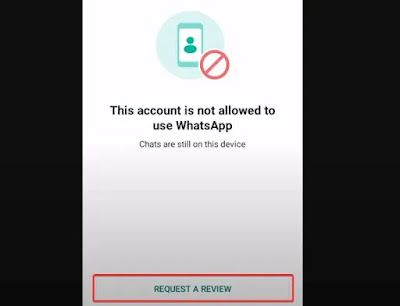
Is your WhatsApp account currently banned? Numerous users of WhatsApp encounter the issue of being blocked by the platform, often due to alleged violations of its policies. This ban manifests as a notification stating, “This account cannot use WhatsApp” or a similar message when attempting to access WhatsApp on your device.

While some bans may be warranted, there are instances where users find themselves unjustly blocked. This often occurs due to a false flag being raised against their accounts.

In preparation for this article, I spoke with several individuals whose WhatsApp accounts had been suspended. The majority reported that their accounts were blocked arbitrarily, without any direct infringement of WhatsApp’s policies on their part.

Why am I banned from WhatsApp?

If you find yourself in a similar situation, you can take straightforward steps to unblock your WhatsApp account by requesting a review. I will provide guidance on how to contact WhatsApp and initiate the unblocking process. However, before that, let us explore the reasons behind the blocking of WhatsApp accounts .

The primary reason for a ban on a WhatsApp account is typically a breach of the platform's terms and conditions. Below is a compilation of additional actions that may lead to your account being suspended:

1. Spamming: Sending mass messages to random users can result in a ban. WhatsApp has a strict policy against spamming, and recipients may report such behavior. Additionally, if your account has been compromised and used for spamming, this could also lead to a ban, as it is a frequent cause of account suspensions.

2. Multiple reports: If your account receives numerous reports from other users, WhatsApp may take action and impose a ban. It is crucial to be mindful of your interactions on the platform, as user reports can significantly impact your account status .

3. Engaging in suspicious activities: Actions such as creating multiple groups with unfamiliar contacts may also result in your account being banned.

4. Utilizing third-party WhatsApp applications: If your account is banned while using a modified version of WhatsApp, such as GB WhatsApp, it is likely due to the use of that application. WhatsApp actively bans users of these unauthorized versions to reinforce its policy against their usage.

5. Flagged phone identification: An often-overlooked reason for account bans is the flagging of your phone. If suspicious activity has been detected on your device, it may be flagged, leading to a ban on your WhatsApp account when accessed from that phone . 

Restoring access to a banned WhatsApp account can vary significantly in duration, ranging from a few minutes to as long as six months, contingent upon the nature of the ban. There are two primary types of bans: temporary and permanent, both of which can be contested with WhatsApp in an effort to have the ban revoked. It is important to note that some permanent bans may be irreversible.

A specific type of temporary ban is characterized by a countdown timer indicating when access to your account will be reinstated. In such instances, you need only to wait for the countdown to conclude, at which point your account and all associated chats will be restored .

To address a WhatsApp ban if you find yourself unable to access your account, follow these steps:
 

Method 1: Request a Review

In cases of certain WhatsApp bans, particularly temporary ones, you have the option to request a review. If you encounter a message indicating that your account is blocked, look for the option labeled REQUEST A REVIEW and click on it.

This action will initiate a review process by WhatsApp, which will examine your account alongside your device details to ascertain whether the ban was issued in error. After selecting the REQUEST A REVIEW option, you will be given the opportunity to provide additional information to support your case.

This step is crucial in enhancing your likelihood of recovering your account, especially if the ban was likely a mistake.

I have witnessed a situation where a user's account was suspended due to unauthorized access, as they had logged in on a different device. However, she successfully regained her account after submitting this information in her support request. 

Here’s an overview of the process of how you can unblock your WhatsApp by requesting a review:

1. On the banned WhatsApp page, click on REQUEST A REVIEW.

Request-a-Review WhatsApp
2. Next, write a concise explanation of how the ban came about and that you personally have not done anything that violates WhatsApp.

2. Next, write a concise explanation of how the ban came about and that you personally have not done anything that violates WhatsApp.

 3. Now click on Submit and wait a while before checking to see if the block has been lifted.


Restore-banned-WhatsApp

Here is a suggestion for the content you might include on the additional information page if you suspect your account was compromised prior to its suspension:

Dear WhatsApp Support, I am writing to contest the ban on my WhatsApp account, which I believe has been imposed in error. I have carefully reviewed your terms of service and am confident that I have adhered to them. Earlier today, I detected an attempt of unauthorized access to my account. Consequently, I kindly request that you reconsider the ban and restore my account, as it serves as my primary communication tool with family and friends.  
Please note that this is merely one example of how to frame your request. Depending on your specific situation, you may wish to formulate a similar message to ensure that WhatsApp support receives the pertinent information necessary for their review. 

Method 2: Reach Out to WhatsApp Help Center - Appeal

An alternative method to recover access to your blocked WhatsApp account is to submit an appeal to WhatsApp Support through the WhatsApp Help Center. This approach can prove to be quite effective, particularly if your account was erroneously banned and you are able to furnish the required information in your appeal. Below are the steps to file a complaint with WhatsApp support :

1. Navigate to the official WhatsApp website and choose “Help Center” from the menu located at the top of the page.

WhatsApp-Help-Center
2. On the Help Center page, scroll down and select Contact Us.

Contact-Us-WhatsApp-Support

 3. Select the "Contact Us" option once more, ensuring that you choose the appropriate category that matches the type of WhatsApp account that has been suspended.

4. Subsequently, on the Contact WhatsApp page, fill in all the required information, making certain that it is precise and linked to the suspended WhatsApp account.

5. In the section labeled “Please enter your message,” describe your suspended account, articulate the reasons you believe the suspension is erroneous, and request reactivation. It is important that your explanation remains clear and succinct, akin to the previous example.

Appeal-to-unban-WhatsApp
You may also send an email detailing your situation to support@whatsapp.com.

It is advisable to exercise patience and keep an eye on WhatsApp for any updates, as submitting this appeal may lead to the reactivation of your account either in the near future or within a timeframe of 3 to 6 months.

If you have successfully regained access to your WhatsApp account following a ban, here are several key recommendations to consider :

1. Reinstall WhatsApp: By reinstalling the application, you will eliminate all data linked to the flag that caused your account ban. It is prudent to undertake this step upon regaining access to your account to prevent future bans.
2. Transition to a new device: If your current device has been flagged, maintaining your account on that device may prove challenging. Therefore, it is advisable to switch to a new device.

Guidelines to Avoid Being Banned on WhatsApp

It is preferable to ensure that your WhatsApp account remains unblocked rather than seeking methods to unblock it. Here are several guidelines to help ensure your WhatsApp account is not blocked:

1. Familiarize yourself with WhatsApp’s Terms of Service and ensure adherence.
2. Avoid utilizing third-party WhatsApp applications such as GBWhatsApp and FMWhatsApp .
3. Refrain from spamming other users on the platform.
4. Do not add unfamiliar users to groups without their explicit consent.
5. Avoid engaging in inappropriate discussions on WhatsApp and refrain from harassing others or infringing upon their rights, as this may lead to reports against you.
6. Safeguard your account from potential hacking attempts.

Conclusion – Navigating the Recovery from a WhatsApp Account Ban

The reinstatement of your account is contingent upon the underlying reason for the ban and the severity of the situation from WhatsApp’s perspective. Nevertheless, the strategies outlined in this document have consistently demonstrated effectiveness in addressing the issue of WhatsApp account bans. It is crucial to meticulously follow each step provided.

In certain situations, immediate recovery of your account may not be possible, and the process for WhatsApp to lift the ban could take some time. In these instances, it may be advisable to create a new account or explore alternative messaging applications such as Telegram.

Furthermore, exercise caution regarding individuals who claim they can help you regain access to your WhatsApp account, as they are frequently associated with fraudulent activities .

FAQs Regarding Banned WhatsApp Accounts  
1. What is the typical duration of a WhatsApp ban?  

The duration of a WhatsApp ban can vary significantly, ranging from a brief period to six months or potentially longer. The length of the ban is generally influenced by the nature of the violation that led to the ban and your ability to successfully appeal to WhatsApp support.

2. How can I contact WhatsApp to request an unban?  

One approach to regain access to your WhatsApp account is to send an email to WhatsApp support at support@whatsapp.com. This email should contain comprehensive details regarding the incident that resulted in the ban, along with your request for reactivation. An example of the appeal format was provided earlier in this document.

3. What steps can I take to unban my GB number from WhatsApp ?  

The use of GBWhatsApp is not authorized by WhatsApp, which can result in your account being banned. However, in many instances, you may be able to recover your account by following the procedures outlined earlier in this article.