
This is default featured slide 1 title

Go to Blogger edit html and find these sentences.Now replace these sentences with your own descriptions.This theme is Bloggerized by Lasantha Bandara - Premiumbloggertemplates.com.

This is default featured slide 2 title

Go to Blogger edit html and find these sentences.Now replace these sentences with your own descriptions.This theme is Bloggerized by Lasantha Bandara - Premiumbloggertemplates.com.

This is default featured slide 3 title

Go to Blogger edit html and find these sentences.Now replace these sentences with your own descriptions.This theme is Bloggerized by Lasantha Bandara - Premiumbloggertemplates.com.

This is default featured slide 4 title

Go to Blogger edit html and find these sentences.Now replace these sentences with your own descriptions.This theme is Bloggerized by Lasantha Bandara - Premiumbloggertemplates.com.

This is default featured slide 5 title

Go to Blogger edit html and find these sentences.Now replace these sentences with your own descriptions.This theme is Bloggerized by Lasantha Bandara - Premiumbloggertemplates.com.

8 Beautiful Android Launchers Ever


Android Launchers


A launcher serves as a fundamental component of the Android user interface. It enables users to initiate applications, access widgets, personalize their home screen, and perform various other functions with ease .

Nevertheless, the default launcher provided with the Android skin on the majority of Android devices may not meet your preferences, particularly if you appreciate customizing your device.

In this regard, utilizing third-party Android launchers is advisable. Essentially, a third-party launcher is an application that substitutes the home screen of your Android device, allowing you to modify its look and functionality without making permanent alterations to the operating system's behavior.

Smart Launcher 6

Smart-launher-6-
Highlights:

    Price: Free with in-app purchases.
    Key Features: Sleek interface, intelligent app organization, ultra-immersive mode, gesture and hotkey customization.
    Customization Options: Fonts, themes, app drawers, app icons, widgets.

Smart Launcher 6 has emerged as a popular choice among Android users. It boasts a clean and user-friendly interface that positions frequently used items at the bottom for quick access, facilitating efficient daily tasks .

Nevertheless, Smart Launcher 6 is not short on functionality. In fact, it offers a variety of customization options that allow users to tailor various aspects of their device's user interface, including fonts, themes, app drawers, app icons, and widgets. Additionally, users can set up gestures and hotkeys to streamline various operations.

In terms of advanced features, Smart Launcher 6 includes an automatic app sorting capability, which organizes applications into categories, alleviating the need for manual sorting. It also features an ultra-immersive mode that enhances screen space by concealing the navigation bar.

Furthermore, the launcher provides a smart search function that simplifies the process of locating items such as contacts and applications, as well as executing various tasks, including web searches. It is no surprise that many users regard it as one of the best launchers available for Android .

 
Download Smart Launcher 6

Nova Launcher

Nova-launcher-

 Highlights:

    Price: Free; Prime version available for $4.99
    Key Features: Custom icon packs, smooth animations, subgrid positioning, backup and restore functionality
    Customization Options: Layout, icons, gestures, animations, themes

Nova Launcher is a hallmark of Android customization. It provides users with comprehensive control over the visual and functional aspects of various user interface elements, allowing for a personalized experience. Given its extensive compatibility, Nova Launcher stands out as the premier choice for Android users interested in custom icon packs.

Although it is packed with features, Nova Launcher maintains a user-friendly and responsive interface. The animations are fluid and quick, even on older Android devices, and the settings for various customization options are easily accessible. Additionally, the backup and restore functionality simplifies the process of transferring your home screen setup and launcher settings when switching devices.

What distinguishes Nova from other launchers is its subgrid positioning system, which offers precise control over the layout of icons and home screen widgets. For those looking to fully unlock Nova's capabilities, upgrading to Nova Launcher Prime provides access to advanced gesture options, app drawer groups, custom icon swipe gestures, and the ability to conceal apps from the drawer.

In conclusion, this launcher is ideal for customization enthusiasts seeking complete control over their device's aesthetics and functionality. It is particularly suited for individuals who enjoy fine-tuning their setups. I recommend considering the premium version for an even more enhanced experience.

Download Nova Launcher

Action Launcher 

Action-launcher-for-Android
Highlights:

    Price: Free with in-app purchases
    Key Features: Integration with Google Discover, shutters, covers, quick theme, smart-size icons
    Customization Options: Dock search bar, app icons, folders, gestures

Action Launcher stands out as one of the most customizable Android launchers available. It encompasses all essential features typical of Android launchers, including gesture controls and customization of the drawer, home screen, and dock. Furthermore, it offers a variety of additional functionalities that enable users to tailor their Android experience in great detail.

Among the notable features of Action Launcher are app shortcuts, integration with Google Discover, smart-size icons, adaptive icons, shutters, covers, and a quick theme. The shutters feature allows users to view an app's widget by swiping on its shortcut, providing a preview of notifications, while the covers feature enables users to launch apps, access hidden folders, and perform various actions through simple tap and swipe gestures .

In terms of visual customization, while Action Launcher may not offer as many options as Nova, it still allows for adjustments to the appearance of the dock search bar, app icons, and folders. Additionally, the quick theme feature automatically modifies the colors of home screen elements to align with the colors present in the user's wallpaper.

Bottom Line: Ideal for users seeking extensive customization options along with distinctive features such as shutters and covers. Well-suited for those who appreciate a highly personalized interface .
 
Download Action Launcher


Niagara Launcher 

Niagara-launcher-for-Android
Highlights:

    Price: Free with in-app purchases
    Key Features: One-handed operation, wave alphabet scrolling, minimalist design, option to hide bloatware
    Customization Options: App icons, widgets, wallpapers, fonts

Niagara Launcher stands out as a lightweight and minimalist Android launcher. Its primary feature is its minimalistic design, which allows users to easily access various elements on the home screen with one hand. This is particularly beneficial for users with larger Android devices, as it enhances usability and simplifies access to applications and other screen elements.

In terms of app accessibility, Niagara Launcher incorporates wave alphabet scrolling, enabling users to navigate through their app list by simply swiping their finger across the alphabet. Additionally, notifications for incoming messages or alerts appear automatically, facilitating quick access. This design choice contributes to a smooth user experience, free from lags or disruptions in animations and transitions .

Furthermore, Niagara Launcher provides essential personalization features comparable to other launcher applications, allowing users to customize app icons, widgets, wallpapers, and fonts. Users also have the option to conceal bloatware or pre-installed applications, helping to declutter the home screen and prioritize more important items. This results in quicker and more convenient access to preferred applications, with the app drawer organized alphabetically for efficient navigation.
Download Niagara Launcher

Microsoft Launcher

Microsoft-launcher-
Highlights:

    Price: Complimentary
    Key Features: Integration with Microsoft services, customizable application icons, Bing daily wallpapers, landscape orientation
    Customization Options: Application icons, themes, widgets, wallpapers

Microsoft Launcher is an Android launcher designed with a focus on productivity, allowing users to display all their calendar events, tasks, and notes directly on the home screen for easy access to their schedules. For individuals who heavily utilize Microsoft accounts or services for both professional and personal purposes, this launcher is ideal for enhancing the functionality of their devices.

Additionally, if you are a Windows user who has tailored your news feed with specific sources, you can install Microsoft Launcher on your Android device to replicate that same news feed experience. A notable feature of this launcher is its support for landscape orientation.

Regarding customization, Microsoft Launcher enables users to modify app icons on their home screen, select between light and dark themes, and automatically update wallpapers from Bing on a daily basis. Furthermore, users can personalize widgets to create a single scrollable page dedicated to all widgets, rather than distributing them across multiple pages, thereby enhancing accessibility .

Bottom Line: This launcher is particularly suitable for users who depend on Microsoft services and seek a productivity-oriented solution. It is an excellent choice for those desiring seamless integration with their work tools, and it is entirely free.
Download Microsoft Launcher 

ARC Launcher

ARC-Gaming-launcher-for-Android-1
Highlights:

    Price: Free with advertisements
    Key Features: Themes, resource management, quick toggles, system monitoring
    Customization Options: Home screen themes, game folders, system toggles

For those in search of a gaming launcher, ARC Launcher stands out as an excellent choice. Its design caters specifically to gamers, offering a variety of themes that can be added at no cost if the default options do not meet your preferences. Users can conveniently place their favorite games on the home screen for immediate access, manage and optimize RAM and CPU usage, and monitor system resource consumption.

A notable feature of this launcher is the availability of quick toggles, such as power saver and torch, along with the capability to display toggle information directly on the home screen, eliminating the need to scroll to check the current WiFi connection.

Nevertheless, a significant drawback is the presence of advertisements. These ads tend to appear promptly after certain actions, such as modifying launcher settings or customizing screen elements, and they may also surface during regular phone usage. While this may be tolerable, the frequency of the ads can be quite irritating .

In conclusion, this launcher is designed for gamers seeking swift access to their games, system optimization, and gaming-themed personalization. Users should anticipate some advertisements, but it remains a valuable tool for managing system resources and accessing essential features quickly.

 
Download ARC launcher


Minimalist Launcher:

Minimalist-launcher-app
Highlights:

    Price: Free with in-app purchases
    Key Features: User-friendly interface, limited home screen applications, battery and widget functionalities
    Customization Options: Color selections, battery widgets, application shortcuts

Minimalist Launcher is an excellent choice for individuals seeking a straightforward and uncluttered experience. Minimalism, as a concept, emphasizes simplicity and prioritizing essential elements.

In recent years, smartphones have evolved into significant sources of distraction, with many launchers emphasizing an abundance of features. In contrast, Minimalist Launcher prioritizes a select few functionalities, allowing only two applications on the home screen in its free version. This limitation is cleverly transformed into a beneficial aspect .

Does this impact performance and usability? It largely depends on individual usage patterns. Accessing all applications is still possible by swiping up to the right, although it introduces a slight friction, which aligns with the overall theme. The launcher offers various color options; for an optimal experience, it is recommended to select either white or solid black. The battery and widget functionalities enable users to monitor battery percentage and additional information.

Conclusion: This launcher is perfect for users desiring a simple, distraction-free interface with fundamental features. It is particularly suited for those aiming for a digital detox and reduced app clutter .

Download Minimalist Launcher

Square Launcher: 

Square Launcher:
Highlights:

    Price: Free with in-app purchases
    Key Features: Customizable tiles, 3D-style tiles, seamless performance, extensive customization options
    Customization Options: Tiles, icons, widgets, tile dimensions, color schemes

Square presents a distinctive approach to the launcher experience, reminiscent of the Windows Phone interface with its square tiles on the home screen. A notable feature of this application is the ability to add applications, shortcuts, contacts, and widgets directly to the home screen for convenient access, allowing users to arrange the tiles according to their preferences, thereby emulating the Windows 10 aesthetic.

By swiping on the home screen, users can access the app drawer, which adheres to the square design theme. Additionally, users can incorporate their recent images into the photos section and showcase them on the home screen.

This launcher provides a significant degree of customization, enabling users to modify tiles, icons, widgets, and more. Furthermore, its performance is both fast and smooth; during my testing, I encountered no issues. After using it for a day, I found it to be reliable. Typically, Windows tile interfaces may experience delays due to multiple functions operating simultaneously on the home screen, but this launcher does not exhibit such problems.

In conclusion, this launcher is ideal for users who appreciate a Windows Phone-like interface with customizable tiles and efficient performance, making it an excellent choice for those seeking a distinctive user experience.

 
Download Square launcher

How to Unblock Banned WhatsApp Account

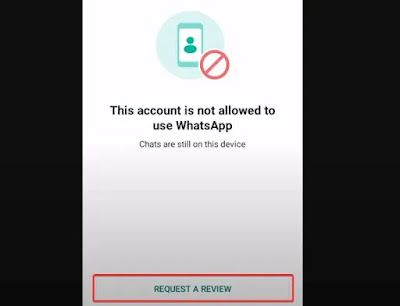
Is your WhatsApp account currently banned? Numerous users of WhatsApp encounter the issue of being blocked by the platform, often due to alleged violations of its policies. This ban manifests as a notification stating, “This account cannot use WhatsApp” or a similar message when attempting to access WhatsApp on your device.

While some bans may be warranted, there are instances where users find themselves unjustly blocked. This often occurs due to a false flag being raised against their accounts.

In preparation for this article, I spoke with several individuals whose WhatsApp accounts had been suspended. The majority reported that their accounts were blocked arbitrarily, without any direct infringement of WhatsApp’s policies on their part.

Why am I banned from WhatsApp?

If you find yourself in a similar situation, you can take straightforward steps to unblock your WhatsApp account by requesting a review. I will provide guidance on how to contact WhatsApp and initiate the unblocking process. However, before that, let us explore the reasons behind the blocking of WhatsApp accounts .

The primary reason for a ban on a WhatsApp account is typically a breach of the platform's terms and conditions. Below is a compilation of additional actions that may lead to your account being suspended:

1. Spamming: Sending mass messages to random users can result in a ban. WhatsApp has a strict policy against spamming, and recipients may report such behavior. Additionally, if your account has been compromised and used for spamming, this could also lead to a ban, as it is a frequent cause of account suspensions.

2. Multiple reports: If your account receives numerous reports from other users, WhatsApp may take action and impose a ban. It is crucial to be mindful of your interactions on the platform, as user reports can significantly impact your account status .

3. Engaging in suspicious activities: Actions such as creating multiple groups with unfamiliar contacts may also result in your account being banned.

4. Utilizing third-party WhatsApp applications: If your account is banned while using a modified version of WhatsApp, such as GB WhatsApp, it is likely due to the use of that application. WhatsApp actively bans users of these unauthorized versions to reinforce its policy against their usage.

5. Flagged phone identification: An often-overlooked reason for account bans is the flagging of your phone. If suspicious activity has been detected on your device, it may be flagged, leading to a ban on your WhatsApp account when accessed from that phone . 

Restoring access to a banned WhatsApp account can vary significantly in duration, ranging from a few minutes to as long as six months, contingent upon the nature of the ban. There are two primary types of bans: temporary and permanent, both of which can be contested with WhatsApp in an effort to have the ban revoked. It is important to note that some permanent bans may be irreversible.

A specific type of temporary ban is characterized by a countdown timer indicating when access to your account will be reinstated. In such instances, you need only to wait for the countdown to conclude, at which point your account and all associated chats will be restored .

To address a WhatsApp ban if you find yourself unable to access your account, follow these steps:
 

Method 1: Request a Review

In cases of certain WhatsApp bans, particularly temporary ones, you have the option to request a review. If you encounter a message indicating that your account is blocked, look for the option labeled REQUEST A REVIEW and click on it.

This action will initiate a review process by WhatsApp, which will examine your account alongside your device details to ascertain whether the ban was issued in error. After selecting the REQUEST A REVIEW option, you will be given the opportunity to provide additional information to support your case.

This step is crucial in enhancing your likelihood of recovering your account, especially if the ban was likely a mistake.

I have witnessed a situation where a user's account was suspended due to unauthorized access, as they had logged in on a different device. However, she successfully regained her account after submitting this information in her support request. 

Here’s an overview of the process of how you can unblock your WhatsApp by requesting a review:

1. On the banned WhatsApp page, click on REQUEST A REVIEW.

Request-a-Review WhatsApp
2. Next, write a concise explanation of how the ban came about and that you personally have not done anything that violates WhatsApp.

2. Next, write a concise explanation of how the ban came about and that you personally have not done anything that violates WhatsApp.

 3. Now click on Submit and wait a while before checking to see if the block has been lifted.


Restore-banned-WhatsApp

Here is a suggestion for the content you might include on the additional information page if you suspect your account was compromised prior to its suspension:

Dear WhatsApp Support, I am writing to contest the ban on my WhatsApp account, which I believe has been imposed in error. I have carefully reviewed your terms of service and am confident that I have adhered to them. Earlier today, I detected an attempt of unauthorized access to my account. Consequently, I kindly request that you reconsider the ban and restore my account, as it serves as my primary communication tool with family and friends.  
Please note that this is merely one example of how to frame your request. Depending on your specific situation, you may wish to formulate a similar message to ensure that WhatsApp support receives the pertinent information necessary for their review. 

Method 2: Reach Out to WhatsApp Help Center - Appeal

An alternative method to recover access to your blocked WhatsApp account is to submit an appeal to WhatsApp Support through the WhatsApp Help Center. This approach can prove to be quite effective, particularly if your account was erroneously banned and you are able to furnish the required information in your appeal. Below are the steps to file a complaint with WhatsApp support :

1. Navigate to the official WhatsApp website and choose “Help Center” from the menu located at the top of the page.

WhatsApp-Help-Center
2. On the Help Center page, scroll down and select Contact Us.

Contact-Us-WhatsApp-Support

 3. Select the "Contact Us" option once more, ensuring that you choose the appropriate category that matches the type of WhatsApp account that has been suspended.

4. Subsequently, on the Contact WhatsApp page, fill in all the required information, making certain that it is precise and linked to the suspended WhatsApp account.

5. In the section labeled “Please enter your message,” describe your suspended account, articulate the reasons you believe the suspension is erroneous, and request reactivation. It is important that your explanation remains clear and succinct, akin to the previous example.

Appeal-to-unban-WhatsApp
You may also send an email detailing your situation to support@whatsapp.com.

It is advisable to exercise patience and keep an eye on WhatsApp for any updates, as submitting this appeal may lead to the reactivation of your account either in the near future or within a timeframe of 3 to 6 months.

If you have successfully regained access to your WhatsApp account following a ban, here are several key recommendations to consider :

1. Reinstall WhatsApp: By reinstalling the application, you will eliminate all data linked to the flag that caused your account ban. It is prudent to undertake this step upon regaining access to your account to prevent future bans.
2. Transition to a new device: If your current device has been flagged, maintaining your account on that device may prove challenging. Therefore, it is advisable to switch to a new device.

Guidelines to Avoid Being Banned on WhatsApp

It is preferable to ensure that your WhatsApp account remains unblocked rather than seeking methods to unblock it. Here are several guidelines to help ensure your WhatsApp account is not blocked:

1. Familiarize yourself with WhatsApp’s Terms of Service and ensure adherence.
2. Avoid utilizing third-party WhatsApp applications such as GBWhatsApp and FMWhatsApp .
3. Refrain from spamming other users on the platform.
4. Do not add unfamiliar users to groups without their explicit consent.
5. Avoid engaging in inappropriate discussions on WhatsApp and refrain from harassing others or infringing upon their rights, as this may lead to reports against you.
6. Safeguard your account from potential hacking attempts.

Conclusion – Navigating the Recovery from a WhatsApp Account Ban

The reinstatement of your account is contingent upon the underlying reason for the ban and the severity of the situation from WhatsApp’s perspective. Nevertheless, the strategies outlined in this document have consistently demonstrated effectiveness in addressing the issue of WhatsApp account bans. It is crucial to meticulously follow each step provided.

In certain situations, immediate recovery of your account may not be possible, and the process for WhatsApp to lift the ban could take some time. In these instances, it may be advisable to create a new account or explore alternative messaging applications such as Telegram.

Furthermore, exercise caution regarding individuals who claim they can help you regain access to your WhatsApp account, as they are frequently associated with fraudulent activities .

FAQs Regarding Banned WhatsApp Accounts  
1. What is the typical duration of a WhatsApp ban?  

The duration of a WhatsApp ban can vary significantly, ranging from a brief period to six months or potentially longer. The length of the ban is generally influenced by the nature of the violation that led to the ban and your ability to successfully appeal to WhatsApp support.

2. How can I contact WhatsApp to request an unban?  

One approach to regain access to your WhatsApp account is to send an email to WhatsApp support at support@whatsapp.com. This email should contain comprehensive details regarding the incident that resulted in the ban, along with your request for reactivation. An example of the appeal format was provided earlier in this document.

3. What steps can I take to unban my GB number from WhatsApp ?  

The use of GBWhatsApp is not authorized by WhatsApp, which can result in your account being banned. However, in many instances, you may be able to recover your account by following the procedures outlined earlier in this article.


7 Best Websites to Download Free PC Games


free-pc-games

Locating free PC games can be quite challenging. In contrast to mobile games, which are frequently available at no cost, PC games tend to be more expensive. Nevertheless, platforms such as Steam, Epic Games Store, and GOG frequently provide free games and significant discounts on popular titles. Additionally, numerous websites allow users to download PC games without charge. This guide will introduce you to thirteen of the best sources for finding and downloading PC games for free, encompassing both legal and potentially questionable sites that offer a variety of genres and game types.

Supported Platforms: PC (Windows and macOS).  
Gaming Genres Offered: Action, strategy, adventure, indie, and more.  
Free Games: Features weekly free game promotions; includes free-to-play options.  
User Interface: Sleek, contemporary, and user-friendly design.  
Regular Updates and New Releases: Continuously adds new titles and refreshes existing ones.  
Community and Support: Offers forums and customer assistance .  
DRM-Free Options: Some titles are available without digital rights management.

1 Epic Games

Key Features:

    Compatible Platforms: Available on PC (Windows and macOS).
    Game Genres Available: Includes action, strategy, adventure, indie, among others.
    Complimentary Games: Features weekly free game promotions and a selection of free-to-play games.
    User Experience: Offers a sleek, contemporary, and intuitive interface.
    Frequent Updates and New Launches: Regularly introduces new titles and updates to current games.
    Community Engagement and Assistance: Offers forums and customer support services.
    DRM-Free Choices: Certain games are available without digital rights management restrictions .

Epic-Game-Store
 
The Epic Games Store stands out as a leading platform renowned for its vast array of games. Users can legally download PC games and enjoy them on their devices. The store features a diverse selection, ranging from AAA titles to indie games developed by smaller studios. Additionally, the Epic Store hosts exclusive releases annually. It provides both premium and complimentary game collections.

Most titles available on the Epic Store are compatible with Windows and Mac operating systems. The platform encompasses various game genres, including action, strategy, role-playing, simulation, and more. Although not every game is free, Epic Games frequently offers complimentary titles and discounts, typically on a weekly basis and during special events. At the time of this writing, the store is currently hosting a holiday sale and providing several free games .

Games can be downloaded and played via the Epic Store application. The process of downloading games is notably simple: locate the desired game, download it, and begin playing on your device. For first-time users, it is necessary to create an account and install the Epic Games Launcher on their device. Once installed, users can explore the store, discover free games, and install them on their devices.

One can also acquire complimentary games during promotional events and incorporate them into their game library. These games can be launched directly from the application, allowing for immediate gameplay. Furthermore, the Epic Games Store launcher ensures that all games are automatically updated to their latest versions, providing an optimal gaming experience.

I commend the Epic Games Store for its straightforward and user-friendly interface. This simplicity facilitates easy navigation for users seeking to discover and download free games. In summary, the Epic Games Store stands out as an excellent choice for PC gamers desiring a seamless downloading experience. With its intuitive design and regular discounts, users can effortlessly locate and download the finest free games for their PCs. Additionally, the Epic Web Store can be utilized to explore games and add them to one’s library .

Instructions for Acquiring Free Games from the Epic Store:

1. Download the Epic Store application compatible with your device, available for both Windows and Mac.
2. Navigate to the browse tab, select the filter, click on the price option, and choose Free.

Here, you will find a comprehensive list of all free games currently offered on the Epic Store. Select any game and click the get button to download it at no cost. The game will then be added to your Epic Games library. Proceed to the library tab, download the game, and install it on your device. 

 Visit the Epic Game Store

2 Steam Powered

Steam-Free-Games
Highlights:

- Supported Platforms: Compatible with PC (Windows, macOS, Linux) and VR.
- Gaming Genres Offered: A diverse range from AAA to indie across all categories.
- Free Games: Features numerous free-to-play titles.
- User Interface: Comprehensive yet somewhat intricate for newcomers.
- Regular Updates and New Releases: Provides consistent updates and new game launches.
- Community and Support: Boasts extensive community features, including forums, user reviews, and groups.
- DRM-Free Options: While most titles include DRM, a selection of DRM-free games is available.

Steam is a widely recognized gaming platform where users can access free PC games. The service presents a combination of free and paid games available for download. This selection encompasses both AAA and indie titles. Like the Epic Store, Steam frequently hosts discount sales and special promotions on its paid games. All games available on Steam are legitimate, allowing for hassle-free downloads.

Games on Steam are compatible with various operating systems, including Windows, macOS, and Linux. Users can check game compatibility in the game information section or utilize filters to identify compatible titles for their devices. The Steam application automatically organizes games based on the user's device.

Steam features a variety of game genres, including action, puzzle, strategy, adventure, and more. It offers a collection of both paid and free-to-play games, with some free titles potentially including optional in-game purchases.
 

Downloading games via Steam is an intuitive and uncomplicated process. To begin, one must install the Steam client application on their desktop and create a Steam account. Once this setup is complete, the Steam client serves as a central platform for purchasing, downloading, and managing your game library. Games can be downloaded and installed directly through the client interface.

Additionally, games acquired from Steam are eligible for automatic updates, ensuring that you always have the latest version. The platform also features a cloud save option, which enables you to save and continue your game progress across different devices. While the process of downloading and installing games is relatively simple, first-time users may find navigating the Steam interface somewhat daunting .

Steam also provides community support, allowing users to join groups, engage in discussions, and connect with fellow gamers. In summary, Steam is an excellent choice for legally downloading games on your device, offering a diverse selection of both free and premium titles across various genres and platforms.

To obtain free games from Steam, follow these steps:

1. Download the Steam application on your device, which is compatible with both Windows and Mac.
2. After installation, launch Steam and navigate to the Steam Store.
3. Click on the Categories section, scroll down, and in the filter tab, adjust the price setting to display free games.

Here, you will find a list of all available free games for download and play. Select any game and click on the play option. 

Visit the Steam Game Store

3.Battlenet

Battle-net-free-games
Highlights:

- Supported Platforms: Mainly available on PC (Windows and macOS) .
- Gaming Genres Available: Blizzard’s offerings encompass MMOs, RTS, card games, and FPS.
- Free Games: Certain titles feature free versions (such as the “World of Warcraft” starter edition) or free-to-play elements (like “Hearthstone”).
- User Interface: Intuitive and user-friendly.
- Regular Updates and New Releases: Yes, consistently provided.
- Community and Support: Includes forums and dedicated customer service.
- DRM-Free Options: Games are linked to the user’s Battle.net account.

Battle.net serves as a well-known platform for legally downloading free PC games. In contrast to Epic and Steam, Battle.net specializes in niche titles from Blizzard. It features both free and paid games, along with occasional discounts on various titles .

Games available on Battle.net are compatible with Windows and macOS. The platform includes popular titles such as World of Warcraft, Overwatch, Diablo, StarCraft, and Hearthstone, among others. However, discounts on these games are infrequent. While the majority of offerings are paid, there are several games with free-to-play components, including Hearthstone and World of Warcraft. Additionally, users can occasionally claim free games during promotional discounts, similar to the offerings from Epic and Steam.

The process of downloading games on Battle.net is straightforward. Users can create a Battle.net account and install the Battle.net desktop application on their devices. Once the app is installed, users can explore the Blizzard library, locate free games, and download titles directly through the application. The user interface is designed to be clean and easy to navigate, emphasizing community engagement and connectivity.
 
Visit Battle.Net Game Store

4 App Stores

Free-Games-on-Microsoft-Store

 Highlights:

- Supported Platforms: Compatible with Windows and Mac
- Gaming Genres Available: Mini and casual games
- Free Game Options: Some titles offer paid versions
- User Interface: User-friendly
- Regular Updates and New Releases: Yes
- Community and Support: User reviews available
- DRM-Free Choices: Available at no cost

The Microsoft Store and the Mac App Store are excellent options for acquiring free PC games. A diverse selection of games can be downloaded and played directly from these platforms, ranging from simple casual games to educational and more complex titles. It is important to note that while many games are free, some may include in-app purchases or advertisements.

Typically, the Microsoft Store features a broader array of games compared to the Mac App Store. This disparity is largely due to the greater popularity of Windows for gaming, leading more developers to create titles for this platform. The Microsoft Store also offers a wider variety of free AAA games and genres, including action, adventure, sports, and puzzle games. Both stores provide a combination of free and paid games, allowing users to easily locate and install free titles on their devices. The process of downloading and installing games from either the Microsoft Store or the Mac App Store is also quite simple .\

 Visit Microsoft Store

5 Ocean of Games

Ocean-of-Games-website

 
Highlights:

- Supported Platforms: Primarily PC Games, Mainly Windows
- Gaming Genres Offered: All popular titles – including GTA, FIFA, Call of Duty, and more
- Free Games: Free Cracked versions
- User Interface: User-friendly
- Regular Updates and New Releases: Not available
- Community and Support: Absent
- DRM-Free Options: Available at no cost

Ocean of Games primarily functions as a site for pirated content, where users can access and download cracked PC games without charge. The platform features unauthorized versions of well-known titles such as GTA, Call of Duty, FIFA, among others. It provides a vast selection of PC games across various genres, all available for free .

Games can be downloaded directly from the website using provided links. However, unlike traditional game stores, the installation process for games obtained from sites like Ocean of Games requires considerable manual effort. A diverse array of cracked PC games is accessible at no cost. It is strongly advised to scan any files downloaded to your computer prior to installation, as cracked games may harbor viruses that could pose a risk to your system.

 Visit Ocean of Games

6 iPC Game

ipc-games
Highlights:

- Supported Platforms: Primarily for PC Games, predominantly Windows
- Gaming Genres Available: A wide range of popular titles, including mini and casual games
- Free Games: Cracked PC games
- User Interface: User-friendly
- Regular Updates and New Releases: Not available
- Community and Support: Not provided
- DRM-Free Options: Available at no cost

iPC Games is a well-known platform for downloading free cracked PC games. Like Ocean of Games, iPC boasts an extensive library of PC games for download. Users can categorize games by various genres and utilize direct links for downloading and installing games. The installation process is manual, and while the user interface is straightforward and uncluttered, advertisements and intrusive pop-ups can be bothersome. Similar to Ocean of Games, locating specific titles can be challenging, as the site lacks filtering options for sorting games by device.

 
Visit iPC game

Windows 11 ISO Download Official Direct Download Links

Windows 11 ISO Download
To obtain the Windows 11 ISO file, you may utilize the direct links available in the article, which lead to secure official ISO files, or you can download them directly from Microsoft’s official website. Additionally, we have provided instructions for installing Windows 11, bypassing minimum requirements, and assisting with the initial setup process.

Whether you aim to perform a clean installation of Windows or resolve an existing issue, downloading and installing Windows via a bootable USB can be advantageous. You can acquire a copy of Windows 11, create a bootable drive, and proceed with the installation on your computer. There are numerous methods available for downloading ISO files, and I have outlined various approaches along with a guide to eliminate PC requirements for installing Windows 11.

Downloading the Windows 11 ISO File

Windows 11 can be downloaded officially from the Microsoft website or through Google Drive links, allowing you to save the file directly to your device. Numerous third-party options also facilitate straightforward downloads of Windows 11 ISO files. For a more streamlined process, you may utilize the official Microsoft Media Creation Tool to create a bootable version of Windows.

Latest: Download Windows 11 24H2 Update

The latest Windows 11 24H2 update has begun to roll out to all users. This update introduces new AI features for devices that support Copilot, along with various enhancements to the current Windows 11 operating system.

If you are utilizing a Copilot-enabled PC or are currently running Windows 11, you can download and install the most recent update on your device. Please refer to the ISO installation guide to bypass system requirements and install the latest Windows update using ISO files. Prior to proceeding, here are some known issues that users have encountered following the update to the 24H2 version .

Download Windows 11 24H2 English

Download Windows 11 24H2 German

Download Windows 11 24H2 Spanish 

 Download Links for Windows 11 ISO on Google Drive

While Microsoft provides a straightforward method for downloading the Windows 11 ISO, the process involves several steps. To simplify this, we have taken the initiative to download and upload the ISO to Google Drive, enabling you to obtain it with just one click. This method is both legal and secure, and I will ensure that the file is updated in accordance with the latest releases from Microsoft.

Download Windows 11 Disk Image (ISO) for x64 devices (English)

Download Windows 11 Disk Image (ISO) for x64 devices (Chinese)

Download Windows 11 Disk Image (ISO) for x64 devices (German)

 Obtain Windows 11 Through the Media Creation Tool

Windows 11 can also be acquired via the official Media Creation Tool provided by Microsoft. This tool allows you to either create a bootable USB drive or upgrade your existing Windows installation to the most recent version. It is user-friendly and provides step-by-step guidance throughout the process. Additionally, it guarantees that you receive the latest version of Windows. The tool is available at no cost for users of Windows 10 or Windows 11 .

 Download Windows 11 Installation Media

Download Windows 11 [23H2] ISO From Adguard

Adguard provides an extensive catalog of software and operating systems available for download. While it does not feature the most recent Windows versions, users can access all editions of Windows 11 (prior to 23H3) through the website.

Download the Windows 11 ISO file from Adguard

Download Windows 11 ISO File From Softonic

Additionally, the Windows 11 ISO file can be obtained from the well-known third-party platform, Softonic. This site also offers various programs and Windows 11 in multiple languages. To download, simply visit the website, click on the Download link, and proceed with the file download.

Download Windows ISO file via Softonic

Download Windows 11 Nano Version

Windows Nano represents a streamlined variant of Windows 11, being 40 percent lighter and utilizing fewer system resources. The most recent iteration of Nano Windows 11 is Nano11 23H2 V1, which is based on Windows 11 build 22631.3155. Notably, in the Nano version, the Microsoft Store is substituted with WingetUI, and Microsoft Edge is not included by default, among other modifications.

You can download and install Nano Windows on any compatible device in the same manner as standard Windows, utilizing Rufus. If you wish to install Nano Windows on your device, please refer to the installation guide provided below . 

Download Nano Windows 23H2 V1

 Instructions for Installing Windows 11 ISO Files

After downloading the ISO file, there are several methods available for installing Windows 11 on your device. You may select any approach that suits your requirements. For instance, if you wish to upgrade your current Windows installation while retaining your files, applications, and settings, you can simply mount the ISO file on your computer and initiate the setup process. Alternatively, if you prefer a fresh installation, you can create a bootable USB drive, which can also be utilized to install Windows 11 on additional devices. These two methods are among the most straightforward and are highly recommended for modern PCs .

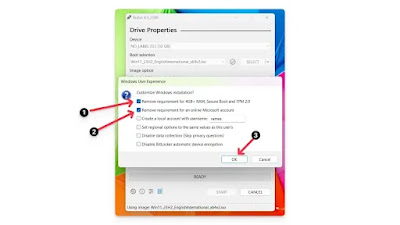
Furthermore, you have the option to burn the ISO file to a DVD for use with older devices or employ the official Windows Media Creation Tool to facilitate the installation of Windows 11 on your computer. In cases where your PC does not meet the minimum system requirements for Windows 11, you can utilize Rufus, an open-source application, to create a bootable USB drive that allows you to bypass these requirements. This tool enables you to circumvent limitations related to TPM, RAM, and the necessity for an online account when installing Windows 11 on your device. Prior to proceeding with the installation of the Windows 11 ISO file, it is essential to review the minimum PC requirements for your device. However, these restrictions can be easily removed using Rufus .

 1. To create a bootable Windows drive utilizing Rufus,

 begin by visiting the Rufus website. Navigate to the Download section and select the most recent version to initiate the download. After the download is complete, double-click the file to proceed with the installation of Rufus on your computer.

Download-rufus-website
Step 2: Now, plug in a USB drive. Ensure that it has at least 8GB of space. Remove and back up any important files from the USB drive.
 
Setup-Refus-to-create-bootable-drive
Step 3: Open Rufus and select your USB drive. Click Select and choose the Windows 11 ISO file you have downloaded.

Remove-minimum-requirement-
 Step 4: Choose GPT as the partition scheme and UEFI as the target system. Name the volume label (e.g., “Windows 11”).

Allow-rufus-to-format-your-drive

 Step 5: Leave the file system as NTFS and click Start. 

Creating-bootable-drive-using-Rufus

Step 6: Confirm the installation and wait for the process to complete.

 Conclusion

To install Windows 11 ISO files without encountering complications, adhere to the outlined steps. Recent updates from Microsoft now provide official public links for downloading Windows 11 files. Furthermore, with certain modifications, it is possible to install Windows 11 on devices that do not meet the standard requirements. Activation of Windows can be completed later through the settings menu. If your previous installation of Windows 11 was activated, the new installation should automatically activate as well .

Before proceeding with an update or performing a complete data wipe to install a fresh version of Windows, it is advisable to back up your data. You may encounter the message ‘This PC can’t run Windows 11’. To resolve this, ensure that you select options to eliminate restrictions when creating a bootable USB with Rufus. Another frequent issue is the absence of a media driver, which can be rectified by using a different USB port or downloading the latest driver. Additionally, partition issues may arise; to address this, confirm that your PC has sufficient storage available.